Product
Use Cases
How it Works
Pricing
Developers
Login

AI image design: **AI IMAGE GENERATION PROMPT — BACKGROUND ONLY** Create a traditional watercolor background for a dramatic but whimsi…
Back to community
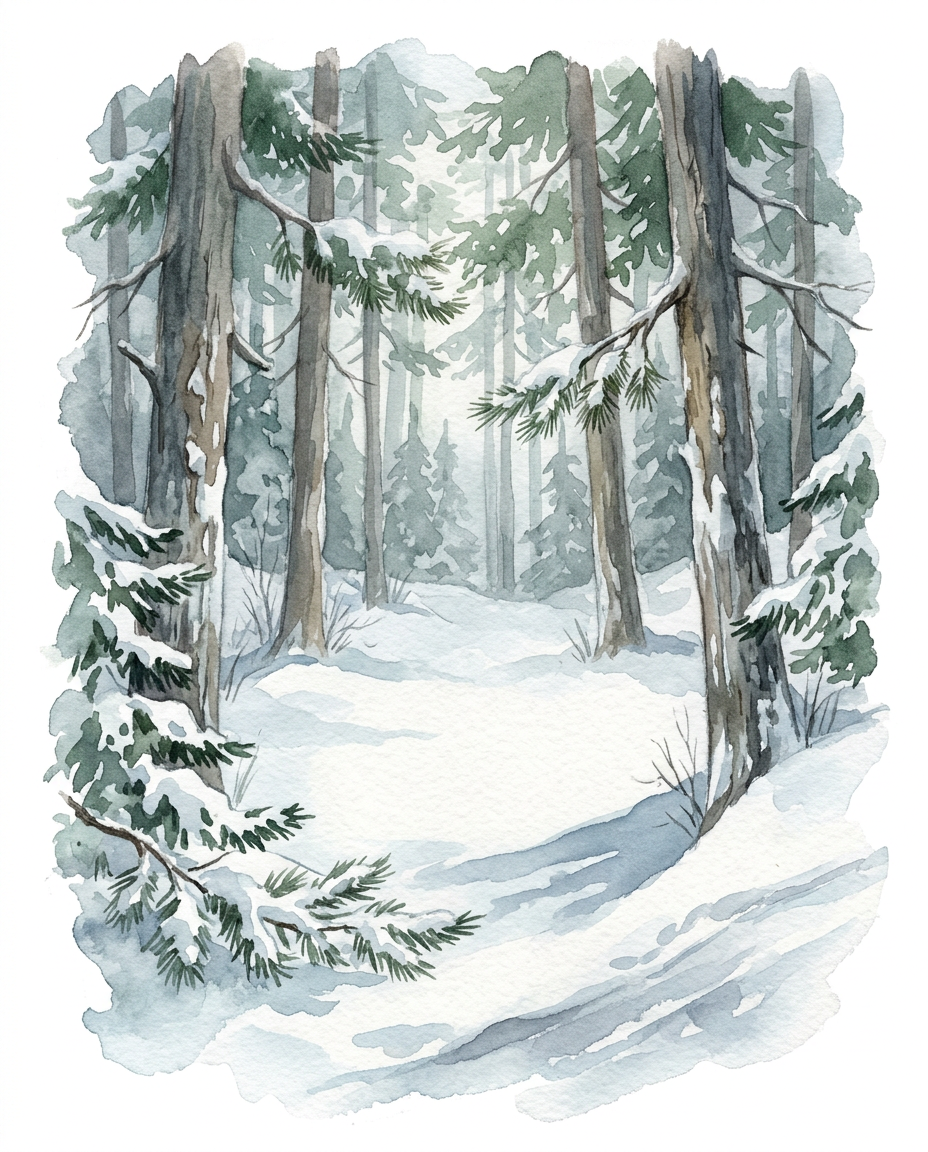
**AI IMAGE GENERATION PROMPT — BACKGROUND ONLY**

Create a traditional watercolor background for a dramatic but whimsical dark-fantasy Christmas storybook scene depicting the roadside woods outside Krampus’s castle. Canvas proportions: portrait 2:3, designed for a 6 × 9 inch print at 300 ppi.

This scene shares the same location as the Mousifer hiding-behind-the-tree illustration. Treat the background as a closer, more intimate view of that same snowy roadside environment. Maintain continuity in pine-tree character, snow color, terrain, and watercolor handling, while allowing the road and distant castle to fall mostly outside the tighter framing.

**CLOSE-UP WOODLAND SETTING**

Create a small snowy clearing beside the road, framed by nearby pine trunks, low evergreen branches, and uneven snowbanks. The environment should feel enclosed enough to support a sudden encounter between two characters.

Use a few recognizable pine trunks and snow-covered branches in the middle and background, but avoid creating an excessively dense forest. The trees are supporting elements rather than the main subject. Their shapes should guide the viewer's eye toward the central interaction area.

Include only a subtle indication of the snowy roadside at the lower or side edge of the composition. A small suggestion of the path's curve or compacted snow is sufficient to connect the scene visually to the previous illustration. The distant castle is not required to be prominent.

**FOREGROUND CHARACTER CLEARANCE**

The actual supplied Mousifer and Krampus PNGs will be placed into the foreground during compositing. Leave a generous, visually quiet central area suitable for the two character silhouettes and their interaction.

Do not generate either character or any replacement figures. Do not paint hands, horns, tails, clothing, faces, weapons, or other body-like forms in the reserved character area. Avoid prominent branches, tree trunks, or snow-covered objects that would accidentally intersect the character silhouettes.

Provide a believable snowy ground plane beneath both characters, with soft, directional blue-grey shadows that can be refined during compositing.

The background should support a moment of sudden capture or confrontation through its close framing and enclosed atmosphere, not through graphic action or visual clutter.

**ATMOSPHERE AND LIGHTING**

Use a cool winter palette of snow white, icy blue-grey, muted evergreen, weathered bark, and soft charcoal. Gentle overcast light filters through the pine canopy. Small areas of pale light between trees may create atmospheric depth, but avoid a dramatic spotlight or exaggerated supernatural glow.

Keep the overall mood tense, quiet, and storybook-like. It should feel like the same forest from scene 3, viewed from closer to the hiding spot.

**WATERCOLOR TECHNIQUE**

Traditional hand-painted watercolor with translucent layered washes, subtle paper grain, natural pigment granulation, soft wet-on-wet foliage, and dry-brush detail on bark and pine needles. Keep distant trees loose and atmospheric, while nearby trunks and snowbanks may have slightly more defined brushwork.

Avoid photorealism, glossy digital painting, hard black outlines, comic-book rendering, and excessively sharp computer-generated texture.

**SOFT TRANSPARENT EDGES**

Create irregular, organic watercolor edges that gradually fade into genuine transparency around the perimeter. Allow branches, snowy ground, and background washes to dissolve into soft pigment blooms. Preserve enough painted texture to establish the forest, but do not produce a solid rectangular background.

**STRICT EXCLUSIONS**

Background only. Do not depict Krampus, Mousifer, any human or animal characters, or additional figures. No text, border, or decorative frame. Do not add a large castle, prominent road sign, tent, or campsite.

**CONTINUITY REQUIREMENT**

Use the same visual world as the earlier snowy roadside scene: similar snow shadows, pine shapes, stone-grey winter atmosphere, and watercolor texture. This is a closer view of the same location, not a completely different forest.

The finished background must accommodate the two supplied character PNGs without requiring major changes to their original proportions or pose.

Community

Design detail

Elephant_1649093

Creator

@Elephant_1649093

Created October 26, 2026
Prompt

**AI IMAGE GENERATION PROMPT — BACKGROUND ONLY** Create a traditional watercolor background for a dramatic but whimsical dark-fantasy Christmas storybook scene depicting the roadside woods outside Krampus’s castle. Canvas proportions: portrait 2:3, designed for a 6 × 9 inch print at 300 ppi. This scene shares the same location as the Mousifer hiding-behind-the-tree illustration. Treat the background as a closer, more intimate view of that same snowy roadside environment. Maintain continuity in pine-tree character, snow color, terrain, and watercolor handling, while allowing the road and distant castle to fall mostly outside the tighter framing. **CLOSE-UP WOODLAND SETTING** Create a small snowy clearing beside the road, framed by nearby pine trunks, low evergreen branches, and uneven snowbanks. The environment should feel enclosed enough to support a sudden encounter between two characters. Use a few recognizable pine trunks and snow-covered branches in the middle and background, but avoid creating an excessively dense forest. The trees are supporting elements rather than the main subject. Their shapes should guide the viewer's eye toward the central interaction area. Include only a subtle indication of the snowy roadside at the lower or side edge of the composition. A small suggestion of the path's curve or compacted snow is sufficient to connect the scene visually to the previous illustration. The distant castle is not required to be prominent. **FOREGROUND CHARACTER CLEARANCE** The actual supplied Mousifer and Krampus PNGs will be placed into the foreground during compositing. Leave a generous, visually quiet central area suitable for the two character silhouettes and their interaction. Do not generate either character or any replacement figures. Do not paint hands, horns, tails, clothing, faces, weapons, or other body-like forms in the reserved character area. Avoid prominent branches, tree trunks, or snow-covered objects that would accidentally intersect the character silhouettes. Provide a believable snowy ground plane beneath both characters, with soft, directional blue-grey shadows that can be refined during compositing. The background should support a moment of sudden capture or confrontation through its close framing and enclosed atmosphere, not through graphic action or visual clutter. **ATMOSPHERE AND LIGHTING** Use a cool winter palette of snow white, icy blue-grey, muted evergreen, weathered bark, and soft charcoal. Gentle overcast light filters through the pine canopy. Small areas of pale light between trees may create atmospheric depth, but avoid a dramatic spotlight or exaggerated supernatural glow. Keep the overall mood tense, quiet, and storybook-like. It should feel like the same forest from scene 3, viewed from closer to the hiding spot. **WATERCOLOR TECHNIQUE** Traditional hand-painted watercolor with translucent layered washes, subtle paper grain, natural pigment granulation, soft wet-on-wet foliage, and dry-brush detail on bark and pine needles. Keep distant trees loose and atmospheric, while nearby trunks and snowbanks may have slightly more defined brushwork. Avoid photorealism, glossy digital painting, hard black outlines, comic-book rendering, and excessively sharp computer-generated texture. **SOFT TRANSPARENT EDGES** Create irregular, organic watercolor edges that gradually fade into genuine transparency around the perimeter. Allow branches, snowy ground, and background washes to dissolve into soft pigment blooms. Preserve enough painted texture to establish the forest, but do not produce a solid rectangular background. **STRICT EXCLUSIONS** Background only. Do not depict Krampus, Mousifer, any human or animal characters, or additional figures. No text, border, or decorative frame. Do not add a large castle, prominent road sign, tent, or campsite. **CONTINUITY REQUIREMENT** Use the same visual world as the earlier snowy roadside scene: similar snow shadows, pine shapes, stone-grey winter atmosphere, and watercolor texture. This is a closer view of the same location, not a completely different forest. The finished background must accommodate the two supplied character PNGs without requiring major changes to their original proportions or pose.

Remix this design

Start for free with full control over models, settings, and canvas tools.

  • ·Generate with full control over models and settings
  • ·Save projects and share back to the community
  • ·No design experience required
Start free — use this prompt
Browse more community designs →
Start free — remix this

What's next?Explore more features

Hiding Elephant product features overview

Explore features

AI generation, vector tools, workflows, catalogs, and collaboration in one workspace.

How Hiding Elephant works

How it works

See how the AI canvas, automation, and teamwork fit together end to end.

Get started with Hiding Elephant

Try it free

Sign in and turn inspiration into projects you can edit, export, and share.

Go from browse to build

Explore what else the Elephant can do.You'll love it

AI image generation

AI Generation

Image tools

Image Tools

Workflow builder

Workflows

Brand and style templates

Brand Management

Product catalog

Product Catalog

Collaboration

Collaboration

Batch image generation

Batch generation

Explore community

Community workflows

The AI designworkspace forfast-moving ideas.

Product

  • Ellie
  • Apps
  • AI Generation
  • Vector Canvas
  • Image Tools
  • Workflows
  • Brand Management
  • Product Catalog
  • My Assets
  • Collaboration

Use Cases

  • E-commerce teams
  • Design agencies
  • Marketing teams
  • Content creators

Quick tools

  • All quick tools
  • Background Remover
  • Image Upscaler
  • Image Vectorizer
  • Image Optimizer
  • Image Reframer

Resources

  • About
  • Pricing
  • FAQ
  • Compare
  • Enterprise
  • Integrations
  • Explore
  • Blog
  • Case studies
  • Contact Us
  • Book a Demo
  • Affiliates

© 2026 Hiding Elephant. All rights reserved

Cookie PolicyPrivacy PolicyTerms of Service
Hiding Elephant