Product
Use Cases
How it Works
Pricing
Developers
Login

AI image design: **AI IMAGE GENERATION PROMPT — BACKGROUND ONLY** on solid white background Create a traditional hand-painted watercol…
Back to community
**AI IMAGE GENERATION PROMPT — BACKGROUND ONLY** on solid white background

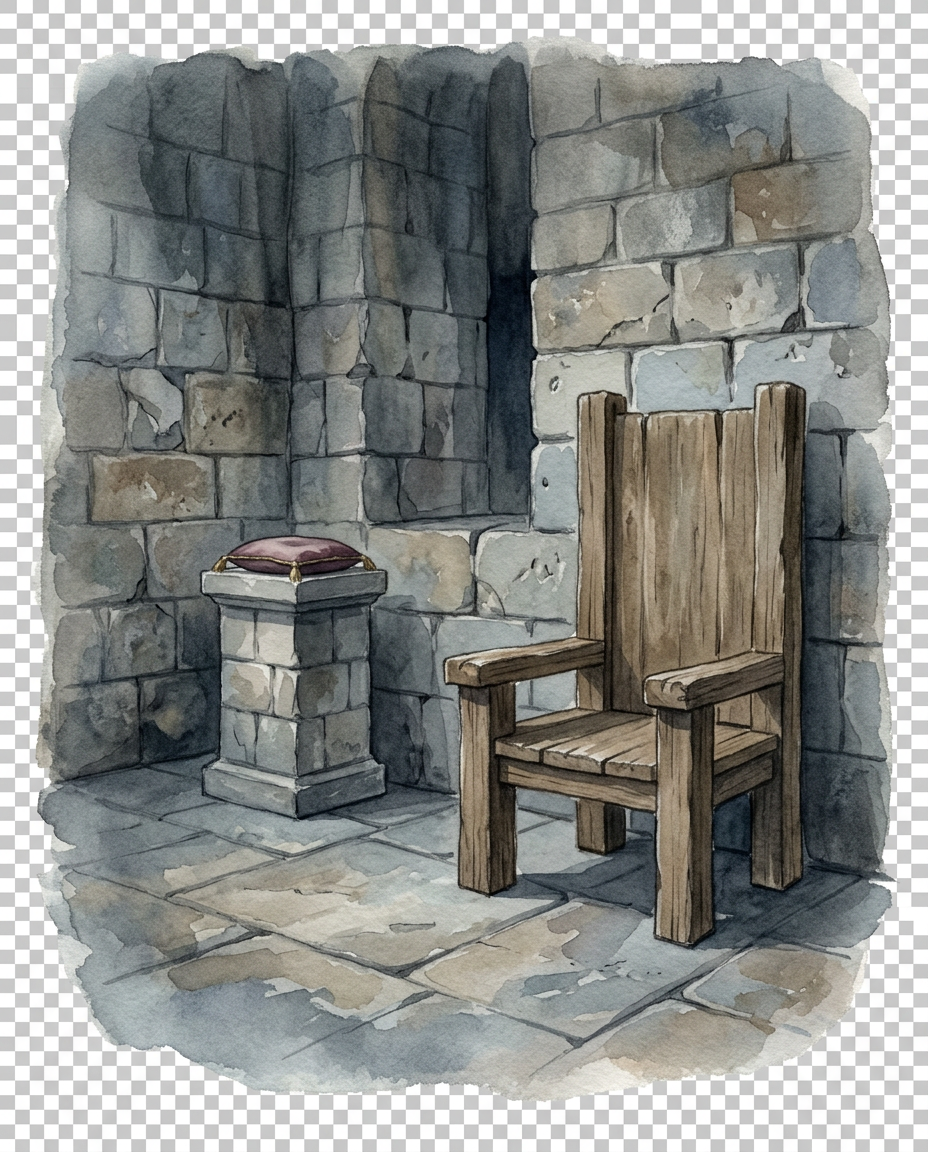
Create a traditional hand-painted watercolor background for a dark-fantasy Christmas storybook illustration set in Krampus’s throne room. Landscape canvas proportions 5:4, designed for a 5 × 4 inch print at 300 ppi.

**ARCHITECTURAL REFERENCE**

Use page 14 of the supplied booklet, corresponding to PDF page 16, as the primary reference for the stone walls. Match the reference's masonry character, stone-block scale, color temperature, texture, and overall architectural atmosphere. The room should feel old, imposing, and functional rather than ornate or luxurious.

Paint large, irregularly shaped stone blocks with visible mortar lines, subtle chips, weathering, and restrained tonal variation. Use the supplied reference to guide the wall colors; do not introduce bright marble, polished modern stone, elaborate gold ornament, or unrelated Gothic decoration.

**THRONE PLACEMENT**

Place a simple, heavy wooden throne on the right side of the composition. It should be built from rough, aged timber with a broad seat, substantial upright back, and straightforward construction. The throne must feel like a basic seat of authority belonging to a strange, rustic fantasy ruler rather than a highly decorated royal chair.

Reserve the throne's seat and surrounding right-side foreground for the actual supplied Krampus PNG. Do not generate Krampus or any substitute figure. The throne must be sized and positioned so the supplied character can appear naturally seated without requiring major changes to the original character image.

Keep the floor visible around the throne and beneath the intended character position. Use subtle stone-floor perspective and soft shadows to establish depth.

**MAGICAL HANDBELL DISPLAY**

On the left side of the composition, behind and to the left of the throne, create a modest stone or weathered masonry plinth. Place a small, clearly visible display cushion on top, leaving a clean central area for the supplied magical handbell PNG.

If the handbell is not provided during background generation, do not generate an elaborate substitute bell as part of the environment. Instead, create the plinth and cushion as a separate compositing area. If a bell reference is available and the workflow specifically requires a temporary composition mock-up, follow it faithfully and replace the temporary bell with the actual supplied asset in the final composite.

The cushion should contrast gently with the plinth, using a muted, rich fabric tone appropriate to the booklet's palette. The bell should ultimately remain visually distinct from the stone wall behind it.

**ROOM DETAILS**

Suggest the rest of the throne room with restrained environmental details: receding stone walls, a few dark recesses, subtle floor joints, and faint architectural shadows. Keep the space simple and atmospheric. Avoid unnecessary furniture, excessive ornament, decorative weapons, large windows, or other objects that distract from the throne and bell.

**LIGHT AND COLOR**

Use muted stone grey, blue-grey, weathered brown, charcoal, and subdued earth tones. Light should feel diffuse and cool, with enough value contrast to separate the wooden throne from the masonry. Reserve stronger highlights for the magical bell asset during compositing.

The room should feel dim but legible, not blacked out. Preserve sufficient detail in the stone walls and floor.

**WATERCOLOR STYLE**

Traditional watercolor washes, visible cold-press paper texture, subtle pigment granulation, softly blended shadows, dry-brush stone texture, and slightly irregular hand-painted edges. Keep the masonry believable without rendering every stone with equally sharp detail. Use more precise environmental brushwork near the throne and bell display, with looser washes toward the outer perimeter.

**TRANSPARENT EDGE TREATMENT**

The background must form an irregular painted vignette, fading into genuine transparency around the outer edges. Let the walls and floor dissolve gradually into soft, broken watercolor marks. Do not create a rectangular room illustration with a hard frame or solid opaque background.

**STRICT EXCLUSIONS**

Background only. Do not generate Krampus, other characters, text, lettering, labels, or a decorative border. Do not alter the supplied throne-room stone-wall reference. Do not include a second throne or additional prominent display objects.

**FINAL COMPOSITION**

The wooden throne occupies the right side; the bell's plinth and cushion sit clearly to its left; the stone walls unify the space. Keep the bell display unobstructed and sufficiently separated from the throne for both to remain readable at 5 × 4 inches. Prepare the scene for accurate compositing with the supplied character and bell PNGs.

Community

Design detail

Elephant_1649093

Creator

@Elephant_1649093

Created October 26, 2026
Prompt

**AI IMAGE GENERATION PROMPT — BACKGROUND ONLY** on solid white background Create a traditional hand-painted watercolor background for a dark-fantasy Christmas storybook illustration set in Krampus’s throne room. Landscape canvas proportions 5:4, designed for a 5 × 4 inch print at 300 ppi. **ARCHITECTURAL REFERENCE** Use page 14 of the supplied booklet, corresponding to PDF page 16, as the primary reference for the stone walls. Match the reference's masonry character, stone-block scale, color temperature, texture, and overall architectural atmosphere. The room should feel old, imposing, and functional rather than ornate or luxurious. Paint large, irregularly shaped stone blocks with visible mortar lines, subtle chips, weathering, and restrained tonal variation. Use the supplied reference to guide the wall colors; do not introduce bright marble, polished modern stone, elaborate gold ornament, or unrelated Gothic decoration. **THRONE PLACEMENT** Place a simple, heavy wooden throne on the right side of the composition. It should be built from rough, aged timber with a broad seat, substantial upright back, and straightforward construction. The throne must feel like a basic seat of authority belonging to a strange, rustic fantasy ruler rather than a highly decorated royal chair. Reserve the throne's seat and surrounding right-side foreground for the actual supplied Krampus PNG. Do not generate Krampus or any substitute figure. The throne must be sized and positioned so the supplied character can appear naturally seated without requiring major changes to the original character image. Keep the floor visible around the throne and beneath the intended character position. Use subtle stone-floor perspective and soft shadows to establish depth. **MAGICAL HANDBELL DISPLAY** On the left side of the composition, behind and to the left of the throne, create a modest stone or weathered masonry plinth. Place a small, clearly visible display cushion on top, leaving a clean central area for the supplied magical handbell PNG. If the handbell is not provided during background generation, do not generate an elaborate substitute bell as part of the environment. Instead, create the plinth and cushion as a separate compositing area. If a bell reference is available and the workflow specifically requires a temporary composition mock-up, follow it faithfully and replace the temporary bell with the actual supplied asset in the final composite. The cushion should contrast gently with the plinth, using a muted, rich fabric tone appropriate to the booklet's palette. The bell should ultimately remain visually distinct from the stone wall behind it. **ROOM DETAILS** Suggest the rest of the throne room with restrained environmental details: receding stone walls, a few dark recesses, subtle floor joints, and faint architectural shadows. Keep the space simple and atmospheric. Avoid unnecessary furniture, excessive ornament, decorative weapons, large windows, or other objects that distract from the throne and bell. **LIGHT AND COLOR** Use muted stone grey, blue-grey, weathered brown, charcoal, and subdued earth tones. Light should feel diffuse and cool, with enough value contrast to separate the wooden throne from the masonry. Reserve stronger highlights for the magical bell asset during compositing. The room should feel dim but legible, not blacked out. Preserve sufficient detail in the stone walls and floor. **WATERCOLOR STYLE** Traditional watercolor washes, visible cold-press paper texture, subtle pigment granulation, softly blended shadows, dry-brush stone texture, and slightly irregular hand-painted edges. Keep the masonry believable without rendering every stone with equally sharp detail. Use more precise environmental brushwork near the throne and bell display, with looser washes toward the outer perimeter. **TRANSPARENT EDGE TREATMENT** The background must form an irregular painted vignette, fading into genuine transparency around the outer edges. Let the walls and floor dissolve gradually into soft, broken watercolor marks. Do not create a rectangular room illustration with a hard frame or solid opaque background. **STRICT EXCLUSIONS** Background only. Do not generate Krampus, other characters, text, lettering, labels, or a decorative border. Do not alter the supplied throne-room stone-wall reference. Do not include a second throne or additional prominent display objects. **FINAL COMPOSITION** The wooden throne occupies the right side; the bell's plinth and cushion sit clearly to its left; the stone walls unify the space. Keep the bell display unobstructed and sufficiently separated from the throne for both to remain readable at 5 × 4 inches. Prepare the scene for accurate compositing with the supplied character and bell PNGs.

Remix this design

Start for free with full control over models, settings, and canvas tools.

  • ·Generate with full control over models and settings
  • ·Save projects and share back to the community
  • ·No design experience required
Start free — use this prompt
Browse more community designs →
Start free — remix this

What's next?Explore more features

Hiding Elephant product features overview

Explore features

AI generation, vector tools, workflows, catalogs, and collaboration in one workspace.

How Hiding Elephant works

How it works

See how the AI canvas, automation, and teamwork fit together end to end.

Get started with Hiding Elephant

Try it free

Sign in and turn inspiration into projects you can edit, export, and share.

Go from browse to build

Explore what else the Elephant can do.You'll love it

AI image generation

AI Generation

Image tools

Image Tools

Workflow builder

Workflows

Brand and style templates

Brand Management

Product catalog

Product Catalog

Collaboration

Collaboration

Batch image generation

Batch generation

Explore community

Community workflows

The AI designworkspace forfast-moving ideas.

Product

  • Ellie
  • Apps
  • AI Generation
  • Vector Canvas
  • Image Tools
  • Workflows
  • Brand Management
  • Product Catalog
  • My Assets
  • Collaboration

Use Cases

  • E-commerce teams
  • Design agencies
  • Marketing teams
  • Content creators

Quick tools

  • All quick tools
  • Background Remover
  • Image Upscaler
  • Image Vectorizer
  • Image Optimizer
  • Image Reframer

Resources

  • About
  • Pricing
  • FAQ
  • Compare
  • Enterprise
  • Integrations
  • Explore
  • Blog
  • Case studies
  • Contact Us
  • Book a Demo
  • Affiliates

© 2026 Hiding Elephant. All rights reserved

Cookie PolicyPrivacy PolicyTerms of Service
Hiding Elephant