Product
Use Cases
How it Works
Pricing
Developers
Login

AI image design: **AI IMAGE GENERATION PROMPT — BACKGROUND ONLY** Create a carefully composed, traditional watercolor background for a…
Back to community
**AI IMAGE GENERATION PROMPT — BACKGROUND ONLY**

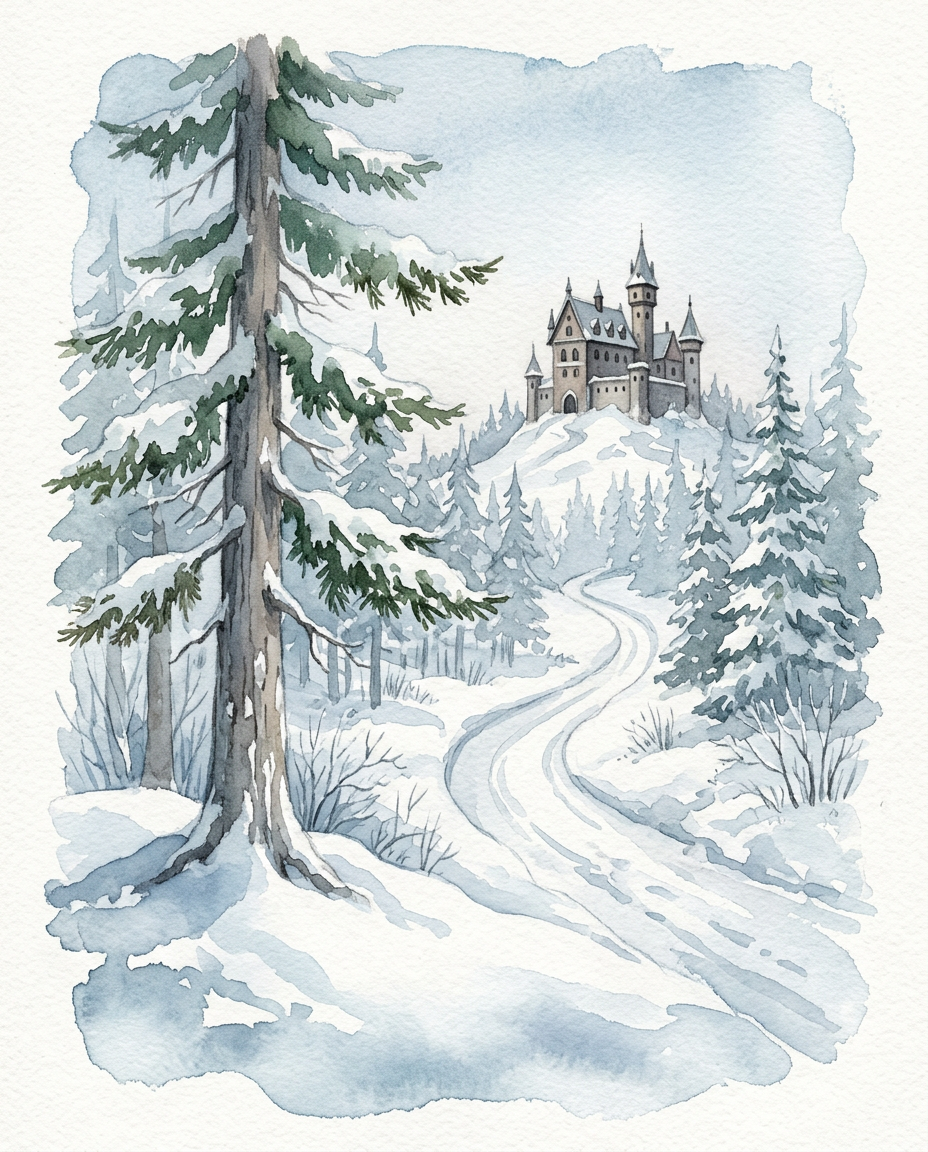
Create a carefully composed, traditional watercolor background for a whimsical dark-fantasy Christmas storybook scene. Canvas proportions: portrait 4:5, designed for a 4 × 5 inch print at 300 ppi.

The scene is a snowy roadside outside Krampus’s castle. The supplied Mousifer character PNG will be composited into the foreground later. The background must communicate that she is concealing herself behind a pine tree and watching the road leading toward the distant castle.

**FOREGROUND TREE AND CHARACTER PLACEMENT**

Place a substantial snow-covered pine tree in the left foreground, with a textured trunk and irregular, layered evergreen branches. The trunk should provide a convincing hiding place for a small character positioned immediately beside or partially overlapping it.

Reserve the appropriate foreground area around the tree for the actual supplied Mousifer PNG. Do not generate a mouse character, person, animal mascot, or silhouette to represent her. Keep the immediate ground around the trunk and the adjacent roadside relatively simple so the character can be integrated without competing visual detail.

The tree must feel naturally rooted in the snowy ground, with a small mound of snow at its base and soft blue-grey shadows. Branches may overlap the outer composition, but do not let them obscure the essential road or distant castle.

**SNOWY ROAD AND PERSPECTIVE**

A narrow, snow-covered road begins in the lower-middle or lower-right portion of the composition and winds gently uphill toward a castle in the distance. Use a subtle S-curve or natural bend to create a clear visual path from the foreground to the destination.

The road should remain recognizable against the surrounding snow through gentle changes in value, shallow tracks, exposed patches of compacted snow, and delicate blue-grey shadows. It should not look like a dark paved highway.

The road leads to Krampus’s castle, positioned in the upper-middle distance on a snowy hill. Use the castle depicted on page one of the supplied booklet PDF as the primary architectural reference. Preserve its distinctive silhouette, roofline, towers, and overall character as closely as the reference permits. Do not invent an unrelated palace or modern building.

The castle should be recognizable yet softened by distance and atmospheric perspective. Its architecture must remain subordinate to the foreground tree and eventual Mousifer character.

**WINTER ENVIRONMENT**

Surround the road with snow-covered pine trees, sparse frozen undergrowth, and softly rolling snowbanks. Use overlapping layers of trees to frame the road naturally. The farther trees should become paler, less detailed, and more blue-grey, creating believable depth.

Add a quiet sense of secrecy and anticipation, as though someone is watching the approach to the castle. Avoid overt horror imagery or exaggerated storm effects.

**COLOR AND WATERCOLOR STYLE**

Use translucent washes of icy blue, pale slate, muted evergreen, cold grey-brown, and snow white. The castle may contain restrained darker stone tones and subtle warm accents only if consistent with the supplied reference.

Match the completed Mousifer tavern watercolor style: traditional pigment behavior, visible paper grain, soft wet-on-wet transitions, loose but intentional brushwork, subtle granulation, and selective dry-brush details on bark and pine branches.

**ORGANIC EDGE TREATMENT**

Create soft, irregular outer watercolor edges fading into genuine transparency. Allow the upper sky area, side foliage, and lower snowbanks to break into uneven pigment blooms and delicate brush marks. Avoid a full rectangular background or a solid opaque sky.

**STRICT EXCLUSIONS**

Generate only the background. Do not generate Mousifer, any person, mouse, animal character, or other foreground figure. Do not add text, captions, graphic effects, or a border. Do not replace the castle reference with a different architectural design.

**COMPOSITIONAL PRIORITY**

The foreground pine tree establishes the hiding place; the curved snowy road establishes direction; the castle establishes the destination. Maintain all three as distinct visual elements within the small portrait format. Leave clear space around the intended character placement and ensure the road leads naturally into the distance.

Community

Design detail

Elephant_1649093

Creator

@Elephant_1649093

Created October 26, 2026
Prompt

**AI IMAGE GENERATION PROMPT — BACKGROUND ONLY** Create a carefully composed, traditional watercolor background for a whimsical dark-fantasy Christmas storybook scene. Canvas proportions: portrait 4:5, designed for a 4 × 5 inch print at 300 ppi. The scene is a snowy roadside outside Krampus’s castle. The supplied Mousifer character PNG will be composited into the foreground later. The background must communicate that she is concealing herself behind a pine tree and watching the road leading toward the distant castle. **FOREGROUND TREE AND CHARACTER PLACEMENT** Place a substantial snow-covered pine tree in the left foreground, with a textured trunk and irregular, layered evergreen branches. The trunk should provide a convincing hiding place for a small character positioned immediately beside or partially overlapping it. Reserve the appropriate foreground area around the tree for the actual supplied Mousifer PNG. Do not generate a mouse character, person, animal mascot, or silhouette to represent her. Keep the immediate ground around the trunk and the adjacent roadside relatively simple so the character can be integrated without competing visual detail. The tree must feel naturally rooted in the snowy ground, with a small mound of snow at its base and soft blue-grey shadows. Branches may overlap the outer composition, but do not let them obscure the essential road or distant castle. **SNOWY ROAD AND PERSPECTIVE** A narrow, snow-covered road begins in the lower-middle or lower-right portion of the composition and winds gently uphill toward a castle in the distance. Use a subtle S-curve or natural bend to create a clear visual path from the foreground to the destination. The road should remain recognizable against the surrounding snow through gentle changes in value, shallow tracks, exposed patches of compacted snow, and delicate blue-grey shadows. It should not look like a dark paved highway. The road leads to Krampus’s castle, positioned in the upper-middle distance on a snowy hill. Use the castle depicted on page one of the supplied booklet PDF as the primary architectural reference. Preserve its distinctive silhouette, roofline, towers, and overall character as closely as the reference permits. Do not invent an unrelated palace or modern building. The castle should be recognizable yet softened by distance and atmospheric perspective. Its architecture must remain subordinate to the foreground tree and eventual Mousifer character. **WINTER ENVIRONMENT** Surround the road with snow-covered pine trees, sparse frozen undergrowth, and softly rolling snowbanks. Use overlapping layers of trees to frame the road naturally. The farther trees should become paler, less detailed, and more blue-grey, creating believable depth. Add a quiet sense of secrecy and anticipation, as though someone is watching the approach to the castle. Avoid overt horror imagery or exaggerated storm effects. **COLOR AND WATERCOLOR STYLE** Use translucent washes of icy blue, pale slate, muted evergreen, cold grey-brown, and snow white. The castle may contain restrained darker stone tones and subtle warm accents only if consistent with the supplied reference. Match the completed Mousifer tavern watercolor style: traditional pigment behavior, visible paper grain, soft wet-on-wet transitions, loose but intentional brushwork, subtle granulation, and selective dry-brush details on bark and pine branches. **ORGANIC EDGE TREATMENT** Create soft, irregular outer watercolor edges fading into genuine transparency. Allow the upper sky area, side foliage, and lower snowbanks to break into uneven pigment blooms and delicate brush marks. Avoid a full rectangular background or a solid opaque sky. **STRICT EXCLUSIONS** Generate only the background. Do not generate Mousifer, any person, mouse, animal character, or other foreground figure. Do not add text, captions, graphic effects, or a border. Do not replace the castle reference with a different architectural design. **COMPOSITIONAL PRIORITY** The foreground pine tree establishes the hiding place; the curved snowy road establishes direction; the castle establishes the destination. Maintain all three as distinct visual elements within the small portrait format. Leave clear space around the intended character placement and ensure the road leads naturally into the distance.

Remix this design

Start for free with full control over models, settings, and canvas tools.

  • ·Generate with full control over models and settings
  • ·Save projects and share back to the community
  • ·No design experience required
Start free — use this prompt
Browse more community designs →
Start free — remix this

What's next?Explore more features

Hiding Elephant product features overview

Explore features

AI generation, vector tools, workflows, catalogs, and collaboration in one workspace.

How Hiding Elephant works

How it works

See how the AI canvas, automation, and teamwork fit together end to end.

Get started with Hiding Elephant

Try it free

Sign in and turn inspiration into projects you can edit, export, and share.

Go from browse to build

Explore what else the Elephant can do.You'll love it

AI image generation

AI Generation

Image tools

Image Tools

Workflow builder

Workflows

Brand and style templates

Brand Management

Product catalog

Product Catalog

Collaboration

Collaboration

Batch image generation

Batch generation

Explore community

Community workflows

The AI designworkspace forfast-moving ideas.

Product

  • Ellie
  • Apps
  • AI Generation
  • Vector Canvas
  • Image Tools
  • Workflows
  • Brand Management
  • Product Catalog
  • My Assets
  • Collaboration

Use Cases

  • E-commerce teams
  • Design agencies
  • Marketing teams
  • Content creators

Quick tools

  • All quick tools
  • Background Remover
  • Image Upscaler
  • Image Vectorizer
  • Image Optimizer
  • Image Reframer

Resources

  • About
  • Pricing
  • FAQ
  • Compare
  • Enterprise
  • Integrations
  • Explore
  • Blog
  • Case studies
  • Contact Us
  • Book a Demo
  • Affiliates

© 2026 Hiding Elephant. All rights reserved

Cookie PolicyPrivacy PolicyTerms of Service
Hiding Elephant