Product
Use Cases
How it Works
Pricing
Login

AI image design: **AI IMAGE GENERATION PROMPT — BACKGROUND ONLY** Create a traditional hand-painted watercolor background for a whimsi…
Back to community
**AI IMAGE GENERATION PROMPT — BACKGROUND ONLY**

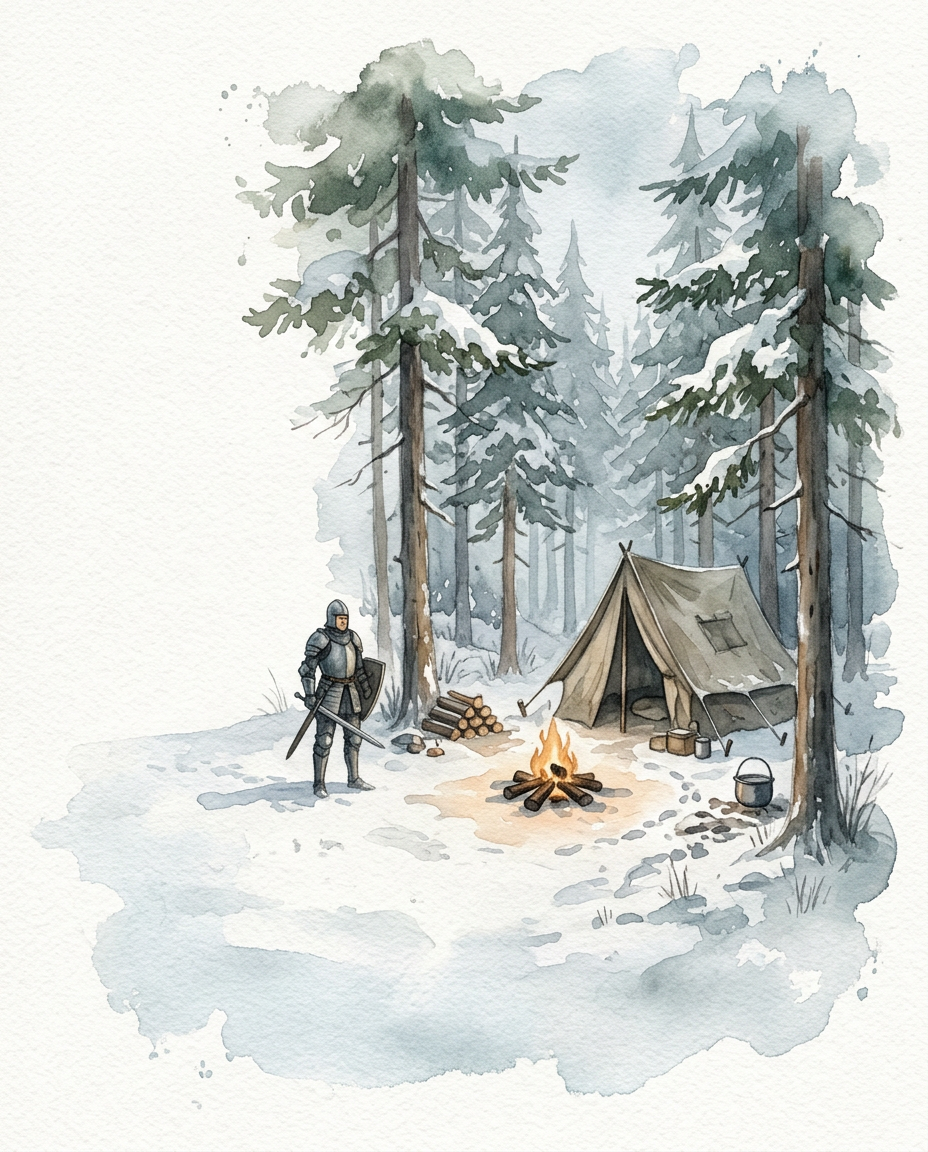
Create a traditional hand-painted watercolor background for a whimsical dark-fantasy Christmas storybook illustration featuring Sir Gerald’s woodland campsite. Canvas proportions: landscape 5:4, designed for a 5 × 4 inch print at 300 ppi.

**COMPOSITION AND CHARACTER CLEARANCE**

The supplied Sir Gerald knight PNG will be placed on the left side of the finished illustration. Leave the left third of the composition available for this character. Generate only the environmental setting in this area, with a snow-covered ground plane that can naturally support the character's feet and cast shadow. Do not generate a replacement knight, human figure, armor, or humanoid silhouette.

Behind and to the right of the character, establish a sheltered snowy forest clearing. Arrange tall, irregular pine trees around the clearing, their branches carrying loose accumulations of snow. The trees should frame the scene without forming an overly dense wall of foliage.

In the middle ground, include a small, simple camping tent made from weathered canvas or practical outdoor fabric. It should look functional, slightly worn, and modest rather than luxurious. Its shape should be clearly readable against the snowy surroundings.

Near the tent, paint a modest campfire with a few darkened logs, small flames, and a gentle amber glow reflected on the surrounding snow. Keep the fire secondary to the eventual character and avoid exaggerated flames or a large bonfire.

Add subtle details suggesting that an eccentric knight has made a home in the woods: a small pile of firewood, a few practical supplies, footprints in the snow, unevenly packed ground, or a simple cooking pot beside the camp. Keep these details restrained and naturally distributed. The environment should feel lived in, not staged like a formal campsite.

**DEPTH AND SPATIAL ARRANGEMENT**

Use a clear foreground, middle ground, and background. The foreground is a lightly textured snowy clearing; the middle ground contains the tent and fire; the background features overlapping pines fading into cool winter haze. Keep the tent and campfire visually separated so they remain recognizable at the relatively small printed scale.

**COLOR AND LIGHT**

Use a muted palette of snow white, icy blue-grey, dusty evergreen, weathered brown, and subdued charcoal. The campfire introduces a small, concentrated area of warm amber, ochre, and muted orange. Let this warmth softly contrast with the cool snow without saturating the whole image.

Lighting should feel like a cold winter afternoon or early evening. Use believable soft shadows and subtle reflected firelight on the nearest snow.

**TRADITIONAL WATERCOLOR STYLE**

Match a polished, storybook-quality watercolor illustration. Use transparent washes, granulation, soft wet-on-wet blending, dry-brush pine needles, loosely defined distant trees, delicate hand-painted details, and visible cold-press paper texture. Avoid crisp digital outlines, glossy materials, cinematic 3D lighting, or photographic realism.

**IRREGULAR TRANSPARENT EDGES**

Create a loose, organic painted vignette. Allow the tree canopy, ground, and outer edges of the clearing to dissolve into soft watercolor blooms and irregular feathered marks, fading into genuine transparency. Avoid a hard rectangular frame or solid-color backdrop. Keep the tent, fire, and primary trees comfortably inside the painted area.

**STRICT EXCLUSIONS**

Background only. Do not generate Sir Gerald or any other human or humanoid character. No text, typography, borders, or decorative frame. Do not place the tent or campfire directly in the reserved left foreground character silhouette area.

**FINAL PURPOSE**

The image will be composited with the original supplied knight PNG. Keep the environment visually coherent around his silhouette, with enough clear snow beneath him for natural grounding and no important campsite details obscured by the reserved character area.

Community

Design detail

Elephant_1649093

Creator

@Elephant_1649093

Created October 26, 2026
Prompt

**AI IMAGE GENERATION PROMPT — BACKGROUND ONLY** Create a traditional hand-painted watercolor background for a whimsical dark-fantasy Christmas storybook illustration featuring Sir Gerald’s woodland campsite. Canvas proportions: landscape 5:4, designed for a 5 × 4 inch print at 300 ppi. **COMPOSITION AND CHARACTER CLEARANCE** The supplied Sir Gerald knight PNG will be placed on the left side of the finished illustration. Leave the left third of the composition available for this character. Generate only the environmental setting in this area, with a snow-covered ground plane that can naturally support the character's feet and cast shadow. Do not generate a replacement knight, human figure, armor, or humanoid silhouette. Behind and to the right of the character, establish a sheltered snowy forest clearing. Arrange tall, irregular pine trees around the clearing, their branches carrying loose accumulations of snow. The trees should frame the scene without forming an overly dense wall of foliage. In the middle ground, include a small, simple camping tent made from weathered canvas or practical outdoor fabric. It should look functional, slightly worn, and modest rather than luxurious. Its shape should be clearly readable against the snowy surroundings. Near the tent, paint a modest campfire with a few darkened logs, small flames, and a gentle amber glow reflected on the surrounding snow. Keep the fire secondary to the eventual character and avoid exaggerated flames or a large bonfire. Add subtle details suggesting that an eccentric knight has made a home in the woods: a small pile of firewood, a few practical supplies, footprints in the snow, unevenly packed ground, or a simple cooking pot beside the camp. Keep these details restrained and naturally distributed. The environment should feel lived in, not staged like a formal campsite. **DEPTH AND SPATIAL ARRANGEMENT** Use a clear foreground, middle ground, and background. The foreground is a lightly textured snowy clearing; the middle ground contains the tent and fire; the background features overlapping pines fading into cool winter haze. Keep the tent and campfire visually separated so they remain recognizable at the relatively small printed scale. **COLOR AND LIGHT** Use a muted palette of snow white, icy blue-grey, dusty evergreen, weathered brown, and subdued charcoal. The campfire introduces a small, concentrated area of warm amber, ochre, and muted orange. Let this warmth softly contrast with the cool snow without saturating the whole image. Lighting should feel like a cold winter afternoon or early evening. Use believable soft shadows and subtle reflected firelight on the nearest snow. **TRADITIONAL WATERCOLOR STYLE** Match a polished, storybook-quality watercolor illustration. Use transparent washes, granulation, soft wet-on-wet blending, dry-brush pine needles, loosely defined distant trees, delicate hand-painted details, and visible cold-press paper texture. Avoid crisp digital outlines, glossy materials, cinematic 3D lighting, or photographic realism. **IRREGULAR TRANSPARENT EDGES** Create a loose, organic painted vignette. Allow the tree canopy, ground, and outer edges of the clearing to dissolve into soft watercolor blooms and irregular feathered marks, fading into genuine transparency. Avoid a hard rectangular frame or solid-color backdrop. Keep the tent, fire, and primary trees comfortably inside the painted area. **STRICT EXCLUSIONS** Background only. Do not generate Sir Gerald or any other human or humanoid character. No text, typography, borders, or decorative frame. Do not place the tent or campfire directly in the reserved left foreground character silhouette area. **FINAL PURPOSE** The image will be composited with the original supplied knight PNG. Keep the environment visually coherent around his silhouette, with enough clear snow beneath him for natural grounding and no important campsite details obscured by the reserved character area.

Remix this design

Start for free with full control over models, settings, and canvas tools.

  • ·Generate with full control over models and settings
  • ·Save projects and share back to the community
  • ·No design experience required
Start free — use this prompt
Browse more community designs →
Start free — remix this

What's next?Explore more features

Hiding Elephant product features overview

Explore features

AI generation, vector tools, workflows, catalogs, and collaboration in one workspace.

How Hiding Elephant works

How it works

See how the AI canvas, automation, and teamwork fit together end to end.

Get started with Hiding Elephant

Try it free

Sign in and turn inspiration into projects you can edit, export, and share.

Go from browse to build

Explore what else the Elephant can do.You'll love it

AI image generation

AI Generation

Image tools

Image Tools

Workflow builder

Workflows

Brand and style templates

Brand Management

Product catalog

Product Catalog

Collaboration

Collaboration

Batch image generation

Batch generation

Explore community

Community workflows

The AI designworkspace forfast-moving ideas.

Product

  • Ellie
  • Apps
  • AI Generation
  • Vector Canvas
  • Image Tools
  • Workflows
  • Brand Management
  • Product Catalog
  • My Assets
  • Collaboration

Use Cases

  • E-commerce teams
  • Design agencies
  • Marketing teams
  • Content creators

Quick tools

  • All quick tools
  • Background Remover
  • Image Upscaler
  • Image Vectorizer
  • Image Optimizer
  • Image Reframer

Resources

  • About
  • Pricing
  • FAQ
  • Compare
  • Enterprise
  • Integrations
  • Explore
  • Blog
  • Case studies
  • Contact Us
  • Book a Demo
  • Affiliates

© 2026 Hiding Elephant. All rights reserved

Cookie PolicyPrivacy PolicyTerms of Service
Hiding Elephant