Product
Use Cases
How it Works
Pricing
Login

AI image design: Edit this image: I will upload a photo of a person's face. Please turn this exact photo into a complete step-by-step pen…
Back to community
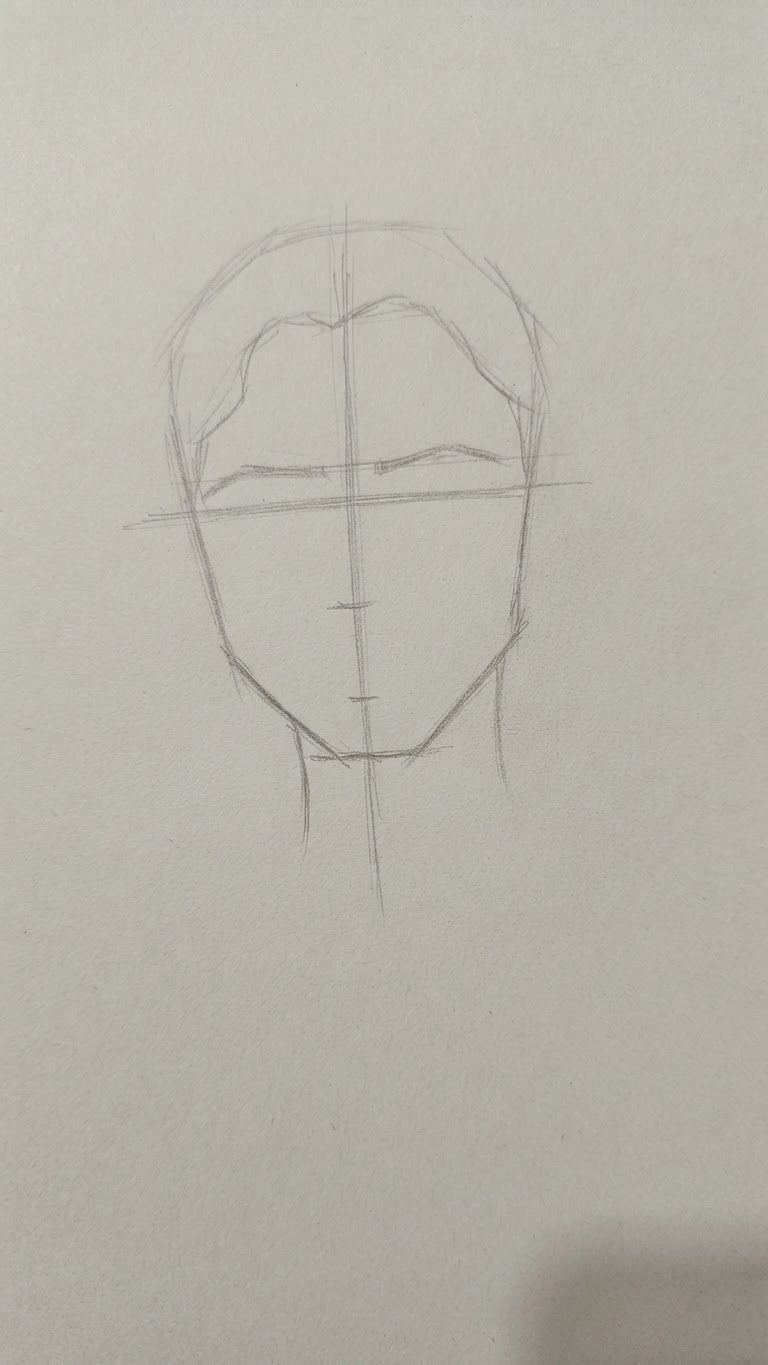
Edit this image: I will upload a photo of a person's face. Please turn this exact photo into a complete step-by-step pencil drawing tutorial, from start to finish, so I can draw it by hand on paper.

Create a separate image for each step, in the correct drawing order:

1. Basic construction lines and face proportions.
2. Head shape and facial outline.
3. Eyes, eyebrows, and eyelids.
4. Nose and nostrils.
5. Lips and mouth.
6. Ears and hair outline.
7. Hair strands and facial details.
8. Light and dark shading, shadows, and highlights.
9. Final realistic pencil portrait.

IMPORTANT:

- Use my uploaded photo as the exact reference.
- Preserve the person's identity, facial features, proportions, and expression.
- Show each step as a separate, clear image.
- Keep all previous steps visible and add only the new drawing elements in each image.
- Use a realistic graphite pencil and black-and-white style.
- Make the instructions suitable for a beginner.
- Do not skip any steps.
- Do not give me only the finished portrait. I need every intermediate drawing stage so I can copy each one onto paper.

Start with Step 1 and show all stages in order until the final portrait.. Change only what that instruction asks for, and keep everything else the same.

Community

Design detail

Elephant_5180853

Creator

@Elephant_5180853

Created October 16, 2026
Prompt

Edit this image: I will upload a photo of a person's face. Please turn this exact photo into a complete step-by-step pencil drawing tutorial, from start to finish, so I can draw it by hand on paper. Create a separate image for each step, in the correct drawing order: 1. Basic construction lines and face proportions. 2. Head shape and facial outline. 3. Eyes, eyebrows, and eyelids. 4. Nose and nostrils. 5. Lips and mouth. 6. Ears and hair outline. 7. Hair strands and facial details. 8. Light and dark shading, shadows, and highlights. 9. Final realistic pencil portrait. IMPORTANT: - Use my uploaded photo as the exact reference. - Preserve the person's identity, facial features, proportions, and expression. - Show each step as a separate, clear image. - Keep all previous steps visible and add only the new drawing elements in each image. - Use a realistic graphite pencil and black-and-white style. - Make the instructions suitable for a beginner. - Do not skip any steps. - Do not give me only the finished portrait. I need every intermediate drawing stage so I can copy each one onto paper. Start with Step 1 and show all stages in order until the final portrait.. Change only what that instruction asks for, and keep everything else the same.

Remix this design

Start for free with full control over models, settings, and canvas tools.

  • ·Generate with full control over models and settings
  • ·Save projects and share back to the community
  • ·No design experience required
Start free — use this prompt
Browse more community designs →
Start free — remix this

What's next?Explore more features

Hiding Elephant product features overview

Explore features

AI generation, vector tools, workflows, catalogs, and collaboration in one workspace.

How Hiding Elephant works

How it works

See how the AI canvas, automation, and teamwork fit together end to end.

Get started with Hiding Elephant

Try it free

Sign in and turn inspiration into projects you can edit, export, and share.

Go from browse to build

Explore what else the Elephant can do.You'll love it

AI image generation

AI Generation

Image tools

Image Tools

Workflow builder

Workflows

Brand and style templates

Brand Management

Product catalog

Product Catalog

Collaboration

Collaboration

Batch image generation

Batch generation

Explore community

Community workflows

The AI designworkspace forfast-moving ideas.

Product

  • Ellie
  • Apps
  • AI Generation
  • Vector Canvas
  • Image Tools
  • Workflows
  • Brand Management
  • Product Catalog
  • My Assets
  • Collaboration

Use Cases

  • E-commerce teams
  • Design agencies
  • Marketing teams
  • Content creators

Quick tools

  • All quick tools
  • Background Remover
  • Image Upscaler
  • Image Vectorizer
  • Image Optimizer
  • Image Reframer

Resources

  • About
  • Pricing
  • FAQ
  • Compare
  • Enterprise
  • Integrations
  • Explore
  • Blog
  • Case studies
  • Contact Us
  • Book a Demo
  • Affiliates

© 2026 Hiding Elephant. All rights reserved

Cookie PolicyPrivacy PolicyTerms of Service
Hiding Elephant