Product
Use Cases
How it Works
Pricing
Login

AI image design: Create a photorealistic editorial image using the supplied studio photograph as the primary reference for architecture, …
Back to community
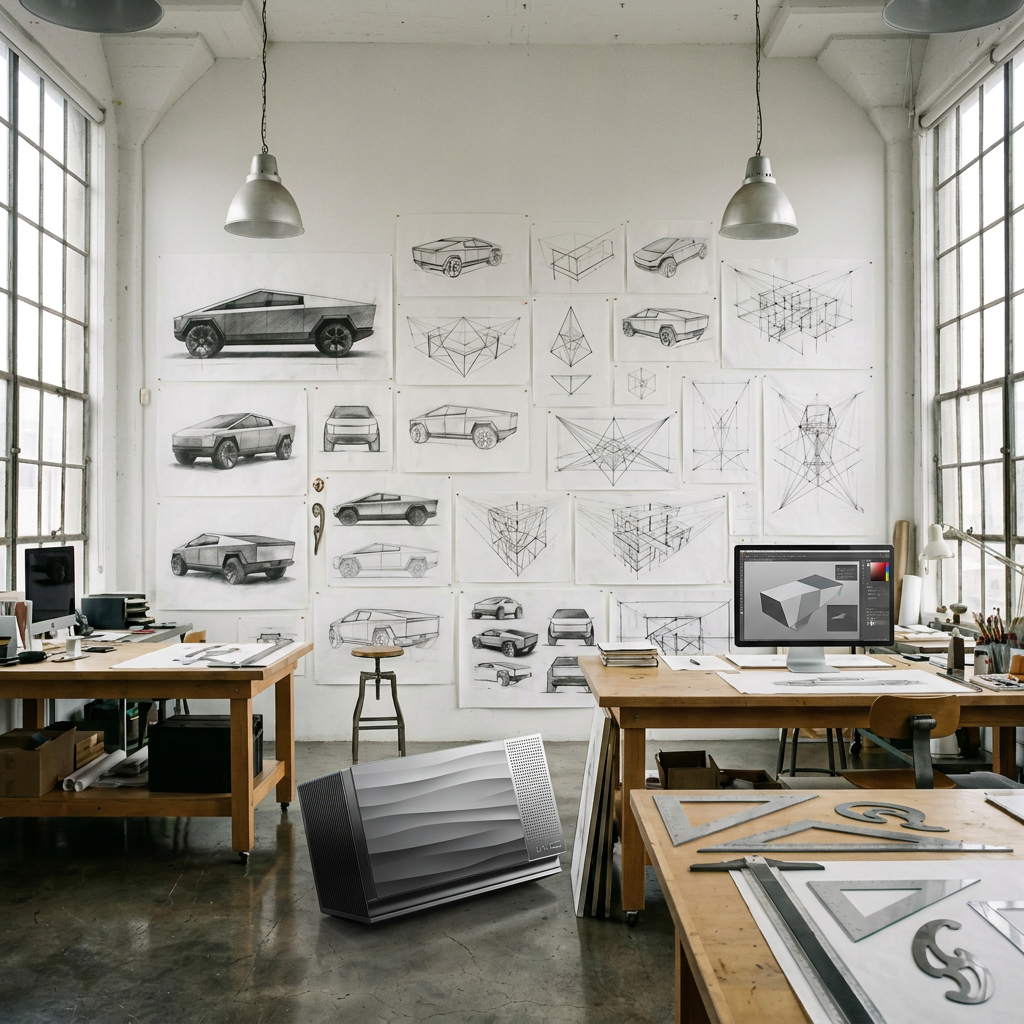
Create a photorealistic editorial image using the supplied studio photograph as the primary reference for architecture, composition, lighting, and atmosphere. Use the supplied @product[Wici:160]  product render as the exact reference for the device.

Preserve the spacious design studio: high white walls, tall industrial windows, soft natural daylight, design sketches and work pinned across the walls, and authentic wooden worktables. Keep the room calm, believable, and lightly lived-in, with natural material textures and restrained colours. Maintain the original camera angle and sense of depth.

Add two slim desktop monitors on separate worktables. Each screen should show a creative task actively in progress: one with a 3D modelling viewport and a partially completed render, the other with a visual design workspace containing shapes, images, and colour panels. Make the screens convincing through visual content, without readable interface text.

Place one @product[Wici:160]  openly on a worktable beside one of the monitors, in the mid-ground. It should remain small within the overall composition, clearly visible and naturally integrated into the workspace. Match its perspective, scale, daylight, and contact shadow to the surrounding objects. Keep it fully unobstructed so it can be isolated for compositing.

Match the product reference precisely: a compact horizontal enclosure with substantial depth, softly rounded corners, a subtly textured cool-grey front, a sloped physical transition into a graphite-black lower housing, a narrow brushed-silver perforated strip on the right, and fine black cooling fins on the visible side. Preserve the original proportions and materials. Do not redesign or mirror the device.

Use soft daylight, realistic exposure, gentle shadows, and enough depth of field to keep the studio and device legible. The result should feel like an authentic photograph of a working design studio, with the product treated as an everyday tool.

Compose in a 4:5 portrait format, keeping the essential elements grouped so the scene can later be adapted to square and wide landscape formats.

No people added. No desktop tower PCs. No dramatic product spotlight, artificial glow, visible Wi-Fi symbols, floating elements, advertising graphics, headlines, captions, badges, watermarks, or readable text anywhere in the image.

The attached images are product reference photos. Use them to ensure accurate product representation in the generated image.

Product-specific instructions: Product details to preserve
Dimensions: 340 × 200 × 143 mm. Maintain realistic scale when placing the product beside other devices, furniture, or people.
Compact, horizontal form with softly rounded corners.
Textured grey surface with subtle flowing waves.
Diagonal transition between the grey shell and dark lower housing.
Silver perforated panel on the right, with a small, understated WiCi logo below the holes.
Fine black fins and restrained metallic finishes.
The product palette is silver, purple, cool grey, graphite, and near-black. Use official renders as the reference for proportions, materials, and construction.

Physical size (for scale only — never print this measurement, these numbers, or these units anywhere on the image): 340 x 200 x 143 mm.

Community

Design detail

Creator

@Elephant_8958251

Created October 15, 2026
Prompt

Create a photorealistic editorial image using the supplied studio photograph as the primary reference for architecture, composition, lighting, and atmosphere. Use the supplied @product[Wici:160] product render as the exact reference for the device. Preserve the spacious design studio: high white walls, tall industrial windows, soft natural daylight, design sketches and work pinned across the walls, and authentic wooden worktables. Keep the room calm, believable, and lightly lived-in, with natural material textures and restrained colours. Maintain the original camera angle and sense of depth. Add two slim desktop monitors on separate worktables. Each screen should show a creative task actively in progress: one with a 3D modelling viewport and a partially completed render, the other with a visual design workspace containing shapes, images, and colour panels. Make the screens convincing through visual content, without readable interface text. Place one @product[Wici:160] openly on a worktable beside one of the monitors, in the mid-ground. It should remain small within the overall composition, clearly visible and naturally integrated into the workspace. Match its perspective, scale, daylight, and contact shadow to the surrounding objects. Keep it fully unobstructed so it can be isolated for compositing. Match the product reference precisely: a compact horizontal enclosure with substantial depth, softly rounded corners, a subtly textured cool-grey front, a sloped physical transition into a graphite-black lower housing, a narrow brushed-silver perforated strip on the right, and fine black cooling fins on the visible side. Preserve the original proportions and materials. Do not redesign or mirror the device. Use soft daylight, realistic exposure, gentle shadows, and enough depth of field to keep the studio and device legible. The result should feel like an authentic photograph of a working design studio, with the product treated as an everyday tool. Compose in a 4:5 portrait format, keeping the essential elements grouped so the scene can later be adapted to square and wide landscape formats. No people added. No desktop tower PCs. No dramatic product spotlight, artificial glow, visible Wi-Fi symbols, floating elements, advertising graphics, headlines, captions, badges, watermarks, or readable text anywhere in the image. The attached images are product reference photos. Use them to ensure accurate product representation in the generated image. Product-specific instructions: Product details to preserve Dimensions: 340 × 200 × 143 mm. Maintain realistic scale when placing the product beside other devices, furniture, or people. Compact, horizontal form with softly rounded corners. Textured grey surface with subtle flowing waves. Diagonal transition between the grey shell and dark lower housing. Silver perforated panel on the right, with a small, understated WiCi logo below the holes. Fine black fins and restrained metallic finishes. The product palette is silver, purple, cool grey, graphite, and near-black. Use official renders as the reference for proportions, materials, and construction. Physical size (for scale only — never print this measurement, these numbers, or these units anywhere on the image): 340 x 200 x 143 mm.

Remix this design

Start for free with full control over models, settings, and canvas tools.

  • ·Generate with full control over models and settings
  • ·Save projects and share back to the community
  • ·No design experience required
Start free — use this prompt
Browse more community designs →
Start free — remix this

What's next?Explore more features

Hiding Elephant product features overview

Explore features

AI generation, vector tools, workflows, catalogs, and collaboration in one workspace.

How Hiding Elephant works

How it works

See how the AI canvas, automation, and teamwork fit together end to end.

Get started with Hiding Elephant

Try it free

Sign in and turn inspiration into projects you can edit, export, and share.

Go from browse to build

Explore what else the Elephant can do.You'll love it

AI image generation

AI Generation

Image tools

Image Tools

Workflow builder

Workflows

Brand and style templates

Brand Management

Product catalog

Product Catalog

Collaboration

Collaboration

Batch image generation

Batch generation

Explore community

Community workflows

The AI designworkspace forfast-moving ideas.

Product

  • Ellie
  • Apps
  • AI Generation
  • Vector Canvas
  • Image Tools
  • Workflows
  • Brand Management
  • Product Catalog
  • My Assets
  • Collaboration

Use Cases

  • E-commerce teams
  • Design agencies
  • Marketing teams
  • Content creators

Quick tools

  • All quick tools
  • Background Remover
  • Image Upscaler
  • Image Vectorizer
  • Image Optimizer
  • Image Reframer

Resources

  • About
  • Pricing
  • FAQ
  • Compare
  • Enterprise
  • Integrations
  • Explore
  • Blog
  • Case studies
  • Contact Us
  • Book a Demo
  • Affiliates

© 2026 Hiding Elephant. All rights reserved

Cookie PolicyPrivacy PolicyTerms of Service
Hiding Elephant