Product
Use Cases
How it Works
Pricing
Login

AI image design: I have already generated the style I want. Now let’s create specific characters and illustrations in the exact style of …
Back to community
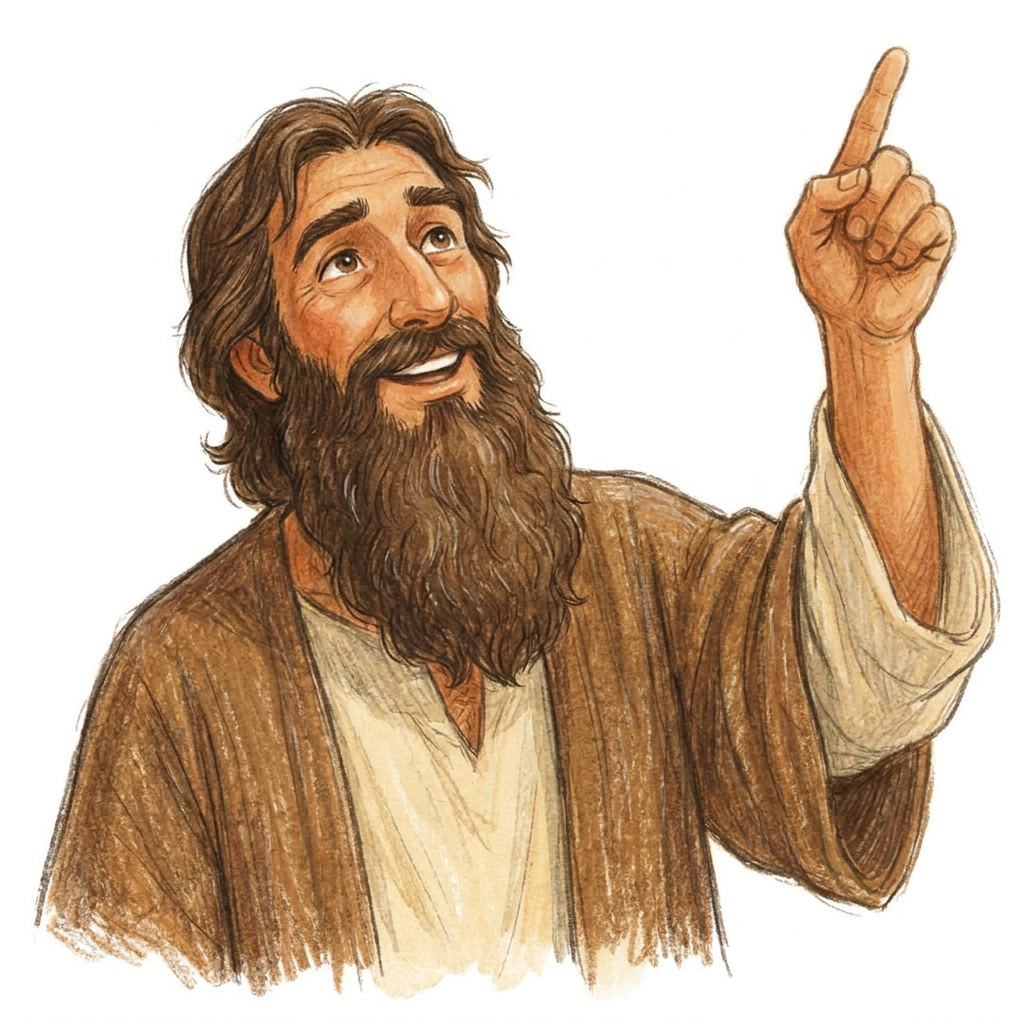
I have already generated the style I want. Now let’s create specific characters and illustrations in the exact style of this image. Illustration style: Traditional hand-drawn children’s storybook illustration with an expressive, slightly loose quality. Characters are first drawn with soft, organic pencil lines, with visible variation in line weight and occasional imperfect or sketch-like marks. Colour is applied in layered coloured-pencil and dry gouache-like textures, allowing subtle paper grain, pencil strokes, uneven pigment and overlapping marks to remain visible. Shapes and silhouettes are clear enough for very young children, but edges are not mechanically perfect or vector-clean.
Character proportions are natural but gently simplified for children’s illustration, rather than exaggerated or chibi. Faces are warm, expressive and immediately readable, with simple natural features. Clothing has enough folds and texture to feel drawn and dimensional without becoming detailed or realistic. Shading is understated and created primarily through textured strokes and variations in colour rather than smooth digital gradients.
The finished artwork should feel like an illustration made by a skilled children’s-book illustrator using traditional drawing materials: charming, tactile and slightly imperfect, while remaining clean, attractive and highly legible for preschool and early-primary children.
Avoid: polished vector-art appearance, perfectly uniform outlines, perfectly smooth colour fills, glossy digital rendering, airbrushed gradients, CGI or 3D appearance, photorealism, anime features, oversized cartoon eyes, exaggerated baby proportions, sticker aesthetics, cinematic lighting, and the overly polished generic look of stock children’s clip-art.
Using this style, make the same character pointing upwards, as if talking about God. Al so, make his beard longer

Community

Design detail

Creator

@Elephant_5438659

Created September 18, 2026
Prompt

I have already generated the style I want. Now let’s create specific characters and illustrations in the exact style of this image. Illustration style: Traditional hand-drawn children’s storybook illustration with an expressive, slightly loose quality. Characters are first drawn with soft, organic pencil lines, with visible variation in line weight and occasional imperfect or sketch-like marks. Colour is applied in layered coloured-pencil and dry gouache-like textures, allowing subtle paper grain, pencil strokes, uneven pigment and overlapping marks to remain visible. Shapes and silhouettes are clear enough for very young children, but edges are not mechanically perfect or vector-clean. Character proportions are natural but gently simplified for children’s illustration, rather than exaggerated or chibi. Faces are warm, expressive and immediately readable, with simple natural features. Clothing has enough folds and texture to feel drawn and dimensional without becoming detailed or realistic. Shading is understated and created primarily through textured strokes and variations in colour rather than smooth digital gradients. The finished artwork should feel like an illustration made by a skilled children’s-book illustrator using traditional drawing materials: charming, tactile and slightly imperfect, while remaining clean, attractive and highly legible for preschool and early-primary children. Avoid: polished vector-art appearance, perfectly uniform outlines, perfectly smooth colour fills, glossy digital rendering, airbrushed gradients, CGI or 3D appearance, photorealism, anime features, oversized cartoon eyes, exaggerated baby proportions, sticker aesthetics, cinematic lighting, and the overly polished generic look of stock children’s clip-art. Using this style, make the same character pointing upwards, as if talking about God. Al so, make his beard longer

Remix this design

Start for free with full control over models, settings, and canvas tools.

  • ·Generate with full control over models and settings
  • ·Save projects and share back to the community
  • ·No design experience required
Start free — use this prompt
Browse more community designs →
Start free — remix this

What's next?Explore more features

Hiding Elephant product features overview

Explore features

AI generation, vector tools, workflows, catalogs, and collaboration in one workspace.

How Hiding Elephant works

How it works

See how the AI canvas, automation, and teamwork fit together end to end.

Get started with Hiding Elephant

Try it free

Sign in and turn inspiration into projects you can edit, export, and share.

Go from browse to build

Explore what else the Elephant can do.You'll love it

AI image generation

AI Generation

Image tools

Image Tools

Workflow builder

Workflows

Brand and style templates

Brand Management

Product catalog

Product Catalog

Collaboration

Collaboration

Batch image generation

Batch generation

Explore community

Community workflows

The AI designworkspace forfast-moving ideas.

Product

  • AI Generation
  • Vector Canvas
  • Image Tools
  • Workflows
  • Brand Management
  • Product Catalog
  • My Assets
  • Collaboration

Use Cases

  • E-commerce teams
  • Design agencies
  • Marketing teams
  • Content creators

Quick tools

  • All quick tools
  • Background Remover
  • Image Upscaler
  • Image Vectorizer
  • Image Optimizer
  • Image Reframer

Resources

  • About
  • Pricing
  • FAQ
  • Compare
  • Enterprise
  • Explore
  • Blog
  • Contact Us
  • Book a Demo
  • Affiliates

© 2026 Hiding Elephant. All rights reserved

Cookie PolicyPrivacy PolicyTerms of Service
Hiding Elephant







