Product
Use Cases
How it Works
Pricing
Developers
Login

AI image design: Professional logo design. To create a stylish logo for an accountant featuring the letters "AK" with a gradient color sc…
Back to community
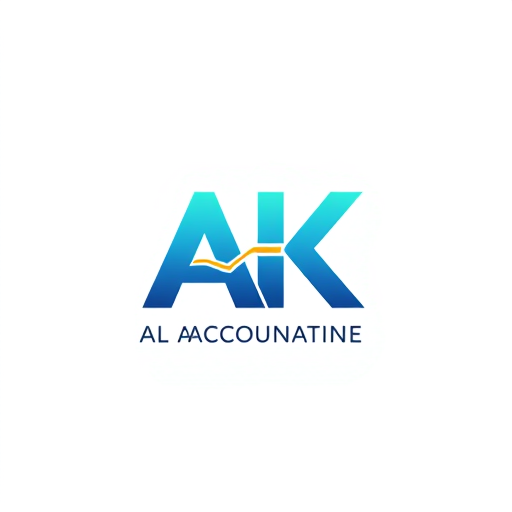
Professional logo design. To create a stylish logo for an accountant featuring the letters "AK" with a gradient color scheme, consider the following design elements and guidelines: Logo Design Concept 1. Typography: Use a modern and professional font for the "AK" to convey trust and reliability. Consider sans-serif fonts for a clean and contemporary look, or serif fonts for a more traditional feel, depending on your target audience. 2. Gradient Color Scheme: Choose a color palette that reflects professionalism while incorporating a gradient effect. Popular choices for accounting logos include shades of blue and green, which symbolize trust and financial stability. You can also consider using a gradient that transitions from a deep blue to a lighter teal or from green to gold, representing growth and prosperity. 3. Symbolic Elements: While the focus is on the "AK," you might integrate subtle symbols that resonate with accounting, such as: A graph or chart integrated into the background or as part of the letter design. Geometric shapes that convey order and structure, essential traits in accounting. 4. Layout: Opt for a minimalistic layout that ensures the logo is versatile and easily recognizable across different mediums (business cards, websites, etc.). Ensure the logo is scalable so it looks good in both large formats (like signage) and small formats (like business cards). Design Process Sketch Ideas: Start by sketching various layouts of "AK" with different font styles and gradient combinations. Digital Mockups: Use design software (like Adobe Illustrator or Looka) to create digital versions of your best sketches. Experiment with different gradients and placements of any additional symbols. Feedback Loop: Share your designs with peers or potential clients to gather feedback on which designs resonate most with them. Final Adjustments: Make necessary adjustments based on feedback, focusing on enhancing readability and visual appeal. Finalize the Logo: Once satisfied with the design, finalize it in vector format to ensure quality across various applications.

Community

Design detail

preca_elephant

Creator

@preca_elephant

Created December 23, 2024
Prompt

Professional logo design. To create a stylish logo for an accountant featuring the letters "AK" with a gradient color scheme, consider the following design elements and guidelines: Logo Design Concept 1. Typography: Use a modern and professional font for the "AK" to convey trust and reliability. Consider sans-serif fonts for a clean and contemporary look, or serif fonts for a more traditional feel, depending on your target audience. 2. Gradient Color Scheme: Choose a color palette that reflects professionalism while incorporating a gradient effect. Popular choices for accounting logos include shades of blue and green, which symbolize trust and financial stability. You can also consider using a gradient that transitions from a deep blue to a lighter teal or from green to gold, representing growth and prosperity. 3. Symbolic Elements: While the focus is on the "AK," you might integrate subtle symbols that resonate with accounting, such as: A graph or chart integrated into the background or as part of the letter design. Geometric shapes that convey order and structure, essential traits in accounting. 4. Layout: Opt for a minimalistic layout that ensures the logo is versatile and easily recognizable across different mediums (business cards, websites, etc.). Ensure the logo is scalable so it looks good in both large formats (like signage) and small formats (like business cards). Design Process Sketch Ideas: Start by sketching various layouts of "AK" with different font styles and gradient combinations. Digital Mockups: Use design software (like Adobe Illustrator or Looka) to create digital versions of your best sketches. Experiment with different gradients and placements of any additional symbols. Feedback Loop: Share your designs with peers or potential clients to gather feedback on which designs resonate most with them. Final Adjustments: Make necessary adjustments based on feedback, focusing on enhancing readability and visual appeal. Finalize the Logo: Once satisfied with the design, finalize it in vector format to ensure quality across various applications.

Remix this design

Start for free with full control over models, settings, and canvas tools.

  • ·Generate with full control over models and settings
  • ·Save projects and share back to the community
  • ·No design experience required
Start free — use this prompt
Browse more community designs →
Start free — remix this

What's next?Explore more features

Hiding Elephant product features overview

Explore features

AI generation, vector tools, workflows, catalogs, and collaboration in one workspace.

How Hiding Elephant works

How it works

See how the AI canvas, automation, and teamwork fit together end to end.

Get started with Hiding Elephant

Try it free

Sign in and turn inspiration into projects you can edit, export, and share.

Go from browse to build

Explore what else the Elephant can do.You'll love it

AI image generation

AI Generation

Image tools

Image Tools

Workflow builder

Workflows

Brand and style templates

Brand Management

Product catalog

Product Catalog

Collaboration

Collaboration

Batch image generation

Batch generation

Explore community

Community workflows

The AI designworkspace forfast-moving ideas.

Product

  • Ellie
  • Apps
  • AI Generation
  • Vector Canvas
  • Image Tools
  • Workflows
  • Brand Management
  • Product Catalog
  • My Assets
  • Collaboration

Use Cases

  • E-commerce teams
  • Design agencies
  • Marketing teams
  • Content creators

Quick tools

  • All quick tools
  • Background Remover
  • Image Upscaler
  • Image Vectorizer
  • Image Optimizer
  • Image Reframer

Resources

  • About
  • Pricing
  • FAQ
  • Compare
  • Enterprise
  • Integrations
  • Explore
  • Blog
  • Case studies
  • Contact Us
  • Book a Demo
  • Affiliates

© 2026 Hiding Elephant. All rights reserved

Cookie PolicyPrivacy PolicyTerms of Service
Hiding Elephant