Product
Use Cases
How it Works
Pricing
Developers
Login

AI image design: Professional logo design. Typography:Use a modern, stylish font with rounded edges or clean lines to keep it trendy.Cons…
Back to community
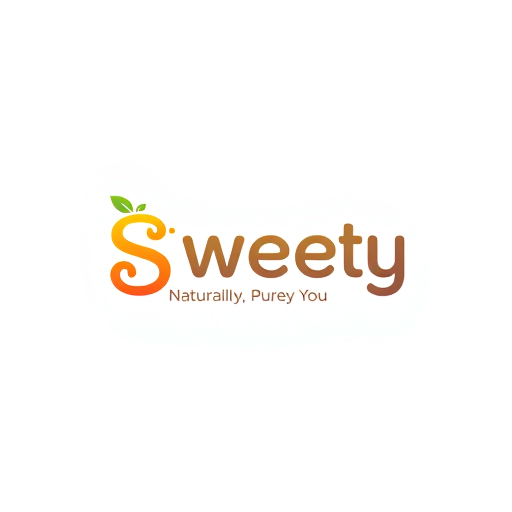
Professional logo design. Typography:Use a modern, stylish font with rounded edges or clean lines to keep it trendy.Consider slight customizations to the letters (e.g., a swirl in the “S” or a playful curve in the “y”).Color Scheme:Vibrant colors (e.g., shades of orange, yellow, and green) to evoke freshness and natural fruit sweetness.Alternatively, go for a two-tone color palette (e.g., pink and white or green and orange) for a clean, sophisticated look.Minimalist Elements:Add a small fruit icon or leaf as part of the design. For example:A leaf sprouting from the letter “S.”A fruit droplet replacing the dot in an “i” or as an accent near the text.These elements will subtly connect your logo to fruits and juices while keeping the simplicity intact.Trendy Accents:Incorporate gradients in the letters for a modern and juicy look.Use soft shadows or 3D effects for depth, while maintaining the overall simplicity.Versatility of DesignYour “Sweety” logo should be adaptable:Black & White Version: For minimal packaging or formal branding.Colorful Version: For labels, advertisements, and social media campaigns.Transparent Background Version: To use over images and varied packaging materials.Tagline Placement (Optional)Consider pairing the logo with a small tagline below or beside it:Example: “Naturally Sweet, Purely You.”Would you like assistance with visual mockups, color palettes, or creating variations for your logo?

Community

Design detail

turn-_elephant

Creator

@turn-_elephant

Created December 14, 2024
Prompt

Professional logo design. Typography:Use a modern, stylish font with rounded edges or clean lines to keep it trendy.Consider slight customizations to the letters (e.g., a swirl in the “S” or a playful curve in the “y”).Color Scheme:Vibrant colors (e.g., shades of orange, yellow, and green) to evoke freshness and natural fruit sweetness.Alternatively, go for a two-tone color palette (e.g., pink and white or green and orange) for a clean, sophisticated look.Minimalist Elements:Add a small fruit icon or leaf as part of the design. For example:A leaf sprouting from the letter “S.”A fruit droplet replacing the dot in an “i” or as an accent near the text.These elements will subtly connect your logo to fruits and juices while keeping the simplicity intact.Trendy Accents:Incorporate gradients in the letters for a modern and juicy look.Use soft shadows or 3D effects for depth, while maintaining the overall simplicity.Versatility of DesignYour “Sweety” logo should be adaptable:Black & White Version: For minimal packaging or formal branding.Colorful Version: For labels, advertisements, and social media campaigns.Transparent Background Version: To use over images and varied packaging materials.Tagline Placement (Optional)Consider pairing the logo with a small tagline below or beside it:Example: “Naturally Sweet, Purely You.”Would you like assistance with visual mockups, color palettes, or creating variations for your logo?

Remix this design

Start for free with full control over models, settings, and canvas tools.

  • ·Generate with full control over models and settings
  • ·Save projects and share back to the community
  • ·No design experience required
Start free — use this prompt
Browse more community designs →
Start free — remix this

What's next?Explore more features

Hiding Elephant product features overview

Explore features

AI generation, vector tools, workflows, catalogs, and collaboration in one workspace.

How Hiding Elephant works

How it works

See how the AI canvas, automation, and teamwork fit together end to end.

Get started with Hiding Elephant

Try it free

Sign in and turn inspiration into projects you can edit, export, and share.

Go from browse to build

Explore what else the Elephant can do.You'll love it

AI image generation

AI Generation

Image tools

Image Tools

Workflow builder

Workflows

Brand and style templates

Brand Management

Product catalog

Product Catalog

Collaboration

Collaboration

Batch image generation

Batch generation

Explore community

Community workflows

The AI designworkspace forfast-moving ideas.

Product

  • Ellie
  • Apps
  • AI Generation
  • Vector Canvas
  • Image Tools
  • Workflows
  • Brand Management
  • Product Catalog
  • My Assets
  • Collaboration

Use Cases

  • E-commerce teams
  • Design agencies
  • Marketing teams
  • Content creators

Quick tools

  • All quick tools
  • Background Remover
  • Image Upscaler
  • Image Vectorizer
  • Image Optimizer
  • Image Reframer

Resources

  • About
  • Pricing
  • FAQ
  • Compare
  • Enterprise
  • Integrations
  • Explore
  • Blog
  • Case studies
  • Contact Us
  • Book a Demo
  • Affiliates

© 2026 Hiding Elephant. All rights reserved

Cookie PolicyPrivacy PolicyTerms of Service
Hiding Elephant