Product
Use Cases
How it Works
Pricing
Login

AI image design: Replace only the background and surrounding floor with a professionally styled newborn photography set inspired by a “Li…
Back to community
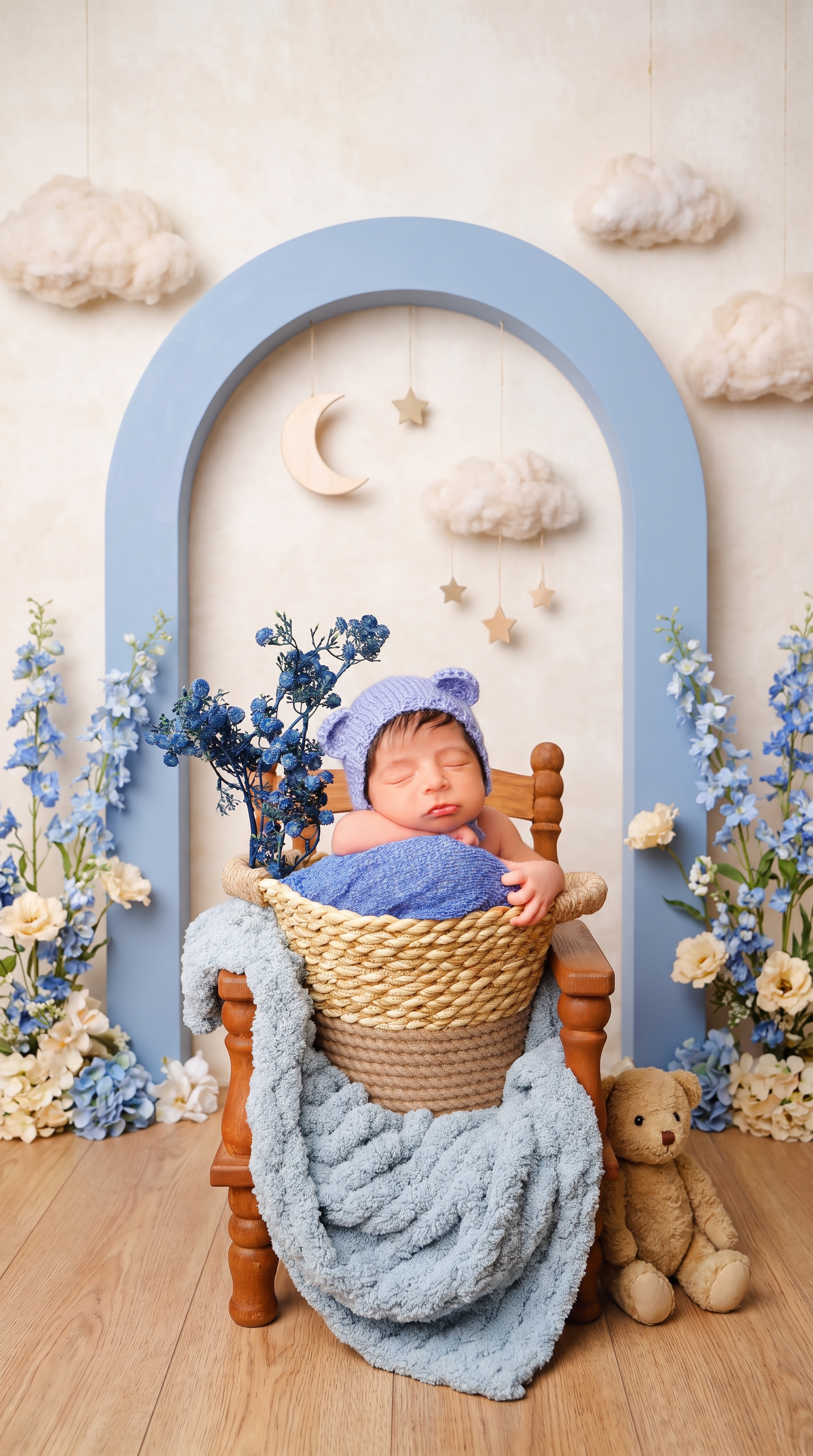
Replace only the background and surrounding floor with a professionally styled newborn photography set inspired by a “Little Bear’s Dream Garden.” Create a charming, layered studio scene with a softly textured ivory backdrop, a large powder-blue decorative arch behind the chair, delicate blue delphiniums and cream blossoms arranged along the outer edges, and a few fluffy cloud props suspended at different heights. Add a small pale wooden crescent moon and tiny muted-gold hanging stars in the upper background. Place one small vintage teddy bear on the floor beside the chair, partially behind it and away from the baby. Use a refined palette of dusty blue, warm cream, soft beige, and natural wood.

Make the set playful and imaginative yet polished and believable, like a premium newborn photography session with real handcrafted props—not a digital fantasy illustration. Keep the decorations asymmetrical and thoughtfully spaced, framing the baby without crowding the face or overlapping the existing flowers. Use soft studio lighting consistent with the original light on the baby, gentle background blur, realistic depth, and natural contact shadows beneath the chair and props.

Preserve the baby’s exact identity, facial features, expression, skin tone, natural skin texture, hair, pose, hands, and fingers. Keep the knitted bear-ear bonnet, blue fabrics, existing blue flowers, woven basket, draped blanket, and entire wooden chair completely unchanged. Maintain the original framing, camera angle, and subject proportions. Replace the old background cleanly through all visible gaps between flower stems and chair parts, preserving fine edges and knitted fibers.

Avoid excessive decorations, bright saturated colors, glitter effects, cartoon styling, CGI, artificial skin smoothing, altered anatomy, duplicated objects, floating props, cutout halos, text, and watermarks.

Community

Design detail

Elephant_3869809

Creator

@Elephant_3869809

Created September 7, 2026
Prompt

Replace only the background and surrounding floor with a professionally styled newborn photography set inspired by a “Little Bear’s Dream Garden.” Create a charming, layered studio scene with a softly textured ivory backdrop, a large powder-blue decorative arch behind the chair, delicate blue delphiniums and cream blossoms arranged along the outer edges, and a few fluffy cloud props suspended at different heights. Add a small pale wooden crescent moon and tiny muted-gold hanging stars in the upper background. Place one small vintage teddy bear on the floor beside the chair, partially behind it and away from the baby. Use a refined palette of dusty blue, warm cream, soft beige, and natural wood. Make the set playful and imaginative yet polished and believable, like a premium newborn photography session with real handcrafted props—not a digital fantasy illustration. Keep the decorations asymmetrical and thoughtfully spaced, framing the baby without crowding the face or overlapping the existing flowers. Use soft studio lighting consistent with the original light on the baby, gentle background blur, realistic depth, and natural contact shadows beneath the chair and props. Preserve the baby’s exact identity, facial features, expression, skin tone, natural skin texture, hair, pose, hands, and fingers. Keep the knitted bear-ear bonnet, blue fabrics, existing blue flowers, woven basket, draped blanket, and entire wooden chair completely unchanged. Maintain the original framing, camera angle, and subject proportions. Replace the old background cleanly through all visible gaps between flower stems and chair parts, preserving fine edges and knitted fibers. Avoid excessive decorations, bright saturated colors, glitter effects, cartoon styling, CGI, artificial skin smoothing, altered anatomy, duplicated objects, floating props, cutout halos, text, and watermarks.

Remix this design

Start for free with full control over models, settings, and canvas tools.

  • ·Generate with full control over models and settings
  • ·Save projects and share back to the community
  • ·No design experience required
Start free — use this prompt
Browse more community designs →
Start free — remix this

What's next?Explore more features

Hiding Elephant product features overview

Explore features

AI generation, vector tools, workflows, catalogs, and collaboration in one workspace.

How Hiding Elephant works

How it works

See how the AI canvas, automation, and teamwork fit together end to end.

Get started with Hiding Elephant

Try it free

Sign in and turn inspiration into projects you can edit, export, and share.

Go from browse to build

Explore what else the Elephant can do.You'll love it

AI image generation

AI Generation

Image tools

Image Tools

Workflow builder

Workflows

Brand and style templates

Brand Management

Product catalog

Product Catalog

Collaboration

Collaboration

Batch image generation

Batch generation

Explore community

Community workflows

The AI designworkspace forfast-moving ideas.

Product

  • AI Generation
  • Vector Canvas
  • Image Tools
  • Workflows
  • Brand Management
  • Product Catalog
  • My Assets
  • Collaboration

Use Cases

  • E-commerce teams
  • Design agencies
  • Marketing teams
  • Content creators

Quick tools

  • All quick tools
  • Background Remover
  • Image Upscaler
  • Image Vectorizer
  • Image Optimizer
  • Image Reframer

Resources

  • About
  • Pricing
  • FAQ
  • Compare
  • Enterprise
  • Explore
  • Blog
  • Contact Us
  • Book a Demo
  • Affiliates

© 2026 Hiding Elephant. All rights reserved

Cookie PolicyPrivacy PolicyTerms of Service
Hiding Elephant







