Product
Use Cases
How it Works
Pricing
Login

AI image design: In the side view, are you suggesting that the shoulder mounts can slide horizontally? I like that idea, as it would allo…
Back to community
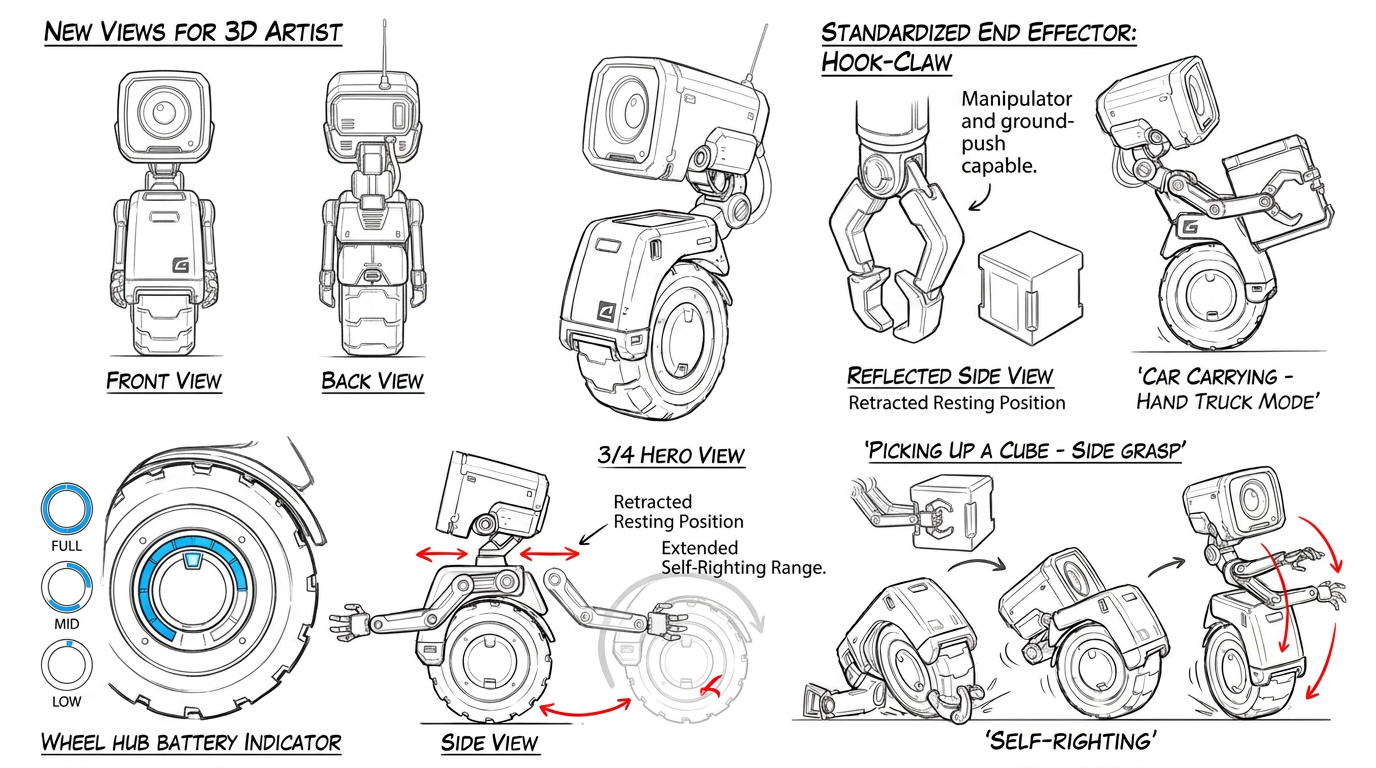
In the side view, are you suggesting that the shoulder mounts can slide horizontally? I like that idea, as it would allow the robot to have a more humanoid silhouette when its shoulders are positioned directly below its neck.

The self-righting idea is also interesting. However, it requires the arms to reach the ground. Could the shoulder mounts move from the position you have shown and continue downward along the curved path marked in red? This would give the arms a greater range of movement, and it is the kind of mechanism I would be able to animate.

I would also like to understand how the arms fold when they are not being used. Could they retract or rest closely against the body without interfering with the wheel? I need to see a natural resting position.

The “carrying – hand truck mode” pose is still a little unclear to me. Does the robot use claws instead of hands in that pose? The end effectors do not appear to be the same as those shown in the other views.

We should probably decide whether it has hands, claws, hooks, or another simpler type of end effector that can both manipulate the cube and push against the floor when the robot is recovering.

As you know, I intend to use machine learning to teach it physical abilities such as picking up cubes. I believe the interaction would be easier to implement and learn if the cube were grasped from its sides. Grasping it from above could also work, although it may be more difficult. I would avoid grasping it from underneath, as I do not currently see a practical way to animate or train that movement.

For the battery indicator, I imagine a circular gauge integrated into the inside of the wheel, similar to the attached reference. A luminous ring, perhaps blue, could gradually empty as the battery level decreases. Ideally, it should remain directly visible on the robot.

Finally, could you also add front and back views for the 3D artist?

Community

Design detail

Elephant_5639848

Creator

@Elephant_5639848

Created August 1, 2026
Prompt

In the side view, are you suggesting that the shoulder mounts can slide horizontally? I like that idea, as it would allow the robot to have a more humanoid silhouette when its shoulders are positioned directly below its neck. The self-righting idea is also interesting. However, it requires the arms to reach the ground. Could the shoulder mounts move from the position you have shown and continue downward along the curved path marked in red? This would give the arms a greater range of movement, and it is the kind of mechanism I would be able to animate. I would also like to understand how the arms fold when they are not being used. Could they retract or rest closely against the body without interfering with the wheel? I need to see a natural resting position. The “carrying – hand truck mode” pose is still a little unclear to me. Does the robot use claws instead of hands in that pose? The end effectors do not appear to be the same as those shown in the other views. We should probably decide whether it has hands, claws, hooks, or another simpler type of end effector that can both manipulate the cube and push against the floor when the robot is recovering. As you know, I intend to use machine learning to teach it physical abilities such as picking up cubes. I believe the interaction would be easier to implement and learn if the cube were grasped from its sides. Grasping it from above could also work, although it may be more difficult. I would avoid grasping it from underneath, as I do not currently see a practical way to animate or train that movement. For the battery indicator, I imagine a circular gauge integrated into the inside of the wheel, similar to the attached reference. A luminous ring, perhaps blue, could gradually empty as the battery level decreases. Ideally, it should remain directly visible on the robot. Finally, could you also add front and back views for the 3D artist?

Remix this design

Start for free with full control over models, settings, and canvas tools.

  • ·Generate with full control over models and settings
  • ·Save projects and share back to the community
  • ·No design experience required
Start free — use this prompt
Browse more community designs →
Start free — remix this

What's next?Explore more features

Hiding Elephant product features overview

Explore features

AI generation, vector tools, workflows, catalogs, and collaboration in one workspace.

How Hiding Elephant works

How it works

See how the AI canvas, automation, and teamwork fit together end to end.

Get started with Hiding Elephant

Try it free

Sign in and turn inspiration into projects you can edit, export, and share.

Go from browse to build

Explore what else the Elephant can do.You'll love it

AI image generation

AI Generation

Image tools

Image Tools

Workflow builder

Workflows

Brand and style templates

Brand Management

Product catalog

Product Catalog

Collaboration

Collaboration

Batch image generation

Batch generation

Explore community

Community workflows

The AI designworkspace forfast-moving ideas.

Product

  • AI Generation
  • Vector Canvas
  • Image Tools
  • Workflows
  • Brand Management
  • Product Catalog
  • My Assets
  • Collaboration

Use Cases

  • E-commerce teams
  • Design agencies
  • Marketing teams
  • Content creators

Quick tools

  • All quick tools
  • Background Remover
  • Image Upscaler
  • Image Vectorizer
  • Image Optimizer
  • Image Reframer

Resources

  • About
  • Pricing
  • FAQ
  • Compare
  • Enterprise
  • Explore
  • Blog
  • Contact Us
  • Book a Demo
  • Affiliates

© 2026 Hiding Elephant. All rights reserved

Cookie PolicyPrivacy PolicyTerms of Service
Hiding Elephant







