Product
Use Cases
How it Works
Pricing
Login

AI image design: Generate ONLY SVG files. Do NOT generate PNG, JPG, WebP, ICO, sprite sheets, icon sheets, previews, mockups, screenshots…
Back to community
Generate ONLY SVG files.
Do NOT generate PNG, JPG, WebP, ICO, sprite sheets, icon sheets, previews, mockups, screenshots, or raster images.
Each icon must be a separate standalone SVG file.
SVG must be fully editable vector graphics.
SVG must use transparent background.
SVG must be optimized and clean.
SVG must scale infinitely without quality loss.
No fixed width or height restrictions.
Use viewBox only.
REFERENCE IMAGE
Analyze the attached file "Idea.png" in extreme detail.

Match EXACTLY:

Colors
Glow intensity
Border thickness
Neon effects
Glassmorphism appearance
Corner radius
Inner shadows
Outer glow
Transparency levels
Layer structure
Light reflections
Blue neon visual style
Red neon visual style
Green neon visual style
Orange neon visual style
Aircraft-industry software appearance
Futuristic S1000D publishing tool aesthetic

Do not redesign.
Do not reinterpret.
Do not simplify.
Do not modernize.
Do not change style.

Reproduce the visual language of the reference image as accurately as possible.


DETAIL LEVEL

Use extreme detail.
Preserve:

Neon bloom
Internal gradients
Edge highlights
Reflection streaks
Layered lighting
Transparency
Soft glow halos
Inner illumination
Bevel effects
Glass surfaces
Futuristic HUD style

Every icon should appear as if extracted directly from the UI.

CONSISTENCY RULES

All icons must:

Belong to same visual family.
Use identical glow treatment.
Use consistent line weights.
Use consistent corner radii.
Use consistent lighting direction.
Use identical glassmorphism treatment.
SVG TECHNICAL REQUIREMENTS

Use:

Linear gradients
Radial gradients
Gaussian blur filters
Glow filters
Opacity layers
Vector paths only

Avoid:

Embedded raster images
Bitmap data
PNG inside SVG
Base64 image embedding
OUTPUT STRUCTURE

Create:

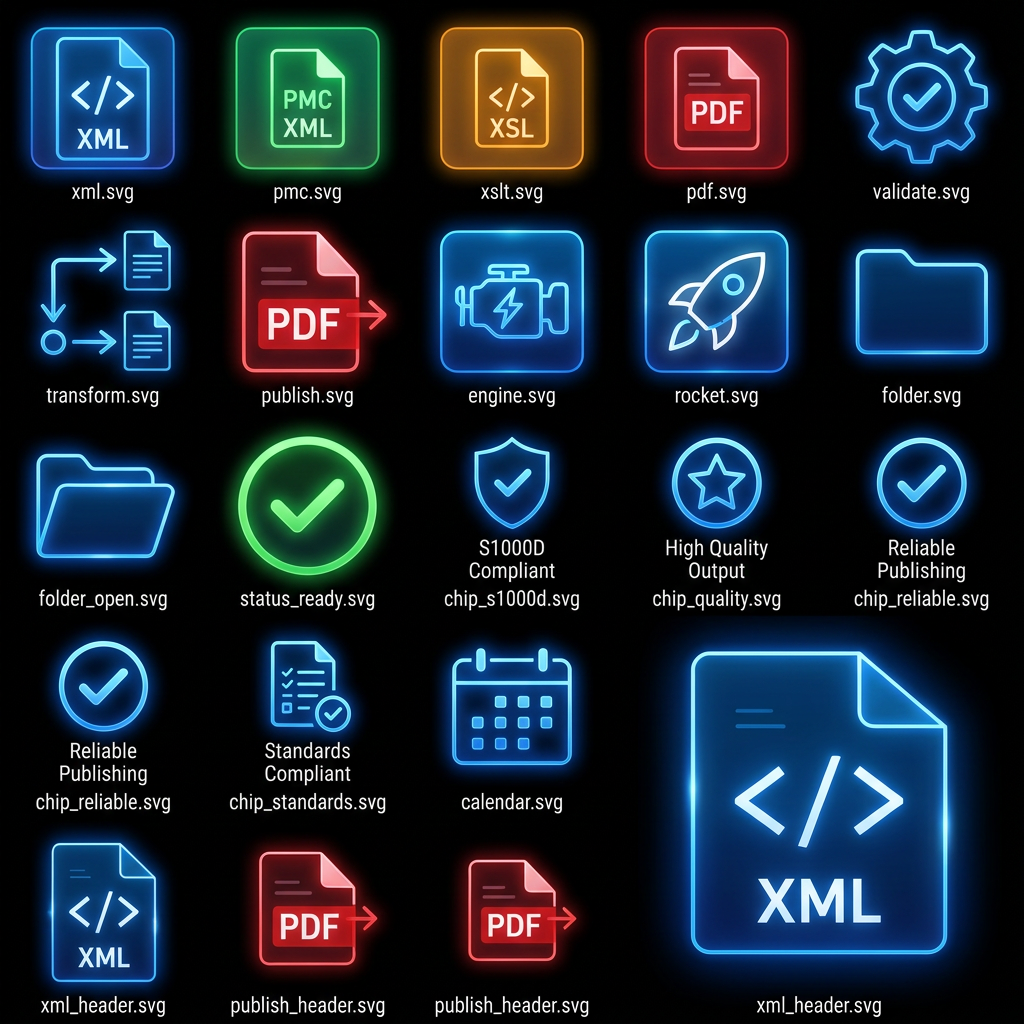
xml.svg
pmc.svg
xslt.svg
pdf.svg
validate.svg
transform.svg
publish.svg
engine.svg
rocket.svg
folder.svg
folder_open.svg
status_ready.svg
chip_s1000d.svg
chip_quality.svg
chip_reliable.svg
chip_standards.svg
calendar.svg
xml_header.svg
publish_header.svg

Generate production-quality SVG assets suitable for a professional PySide6 aviation publishing application.

Community

Design detail

Elephant_2066995

Creator

@Elephant_2066995

Created June 23, 2026
Prompt

Generate ONLY SVG files. Do NOT generate PNG, JPG, WebP, ICO, sprite sheets, icon sheets, previews, mockups, screenshots, or raster images. Each icon must be a separate standalone SVG file. SVG must be fully editable vector graphics. SVG must use transparent background. SVG must be optimized and clean. SVG must scale infinitely without quality loss. No fixed width or height restrictions. Use viewBox only. REFERENCE IMAGE Analyze the attached file "Idea.png" in extreme detail. Match EXACTLY: Colors Glow intensity Border thickness Neon effects Glassmorphism appearance Corner radius Inner shadows Outer glow Transparency levels Layer structure Light reflections Blue neon visual style Red neon visual style Green neon visual style Orange neon visual style Aircraft-industry software appearance Futuristic S1000D publishing tool aesthetic Do not redesign. Do not reinterpret. Do not simplify. Do not modernize. Do not change style. Reproduce the visual language of the reference image as accurately as possible. DETAIL LEVEL Use extreme detail. Preserve: Neon bloom Internal gradients Edge highlights Reflection streaks Layered lighting Transparency Soft glow halos Inner illumination Bevel effects Glass surfaces Futuristic HUD style Every icon should appear as if extracted directly from the UI. CONSISTENCY RULES All icons must: Belong to same visual family. Use identical glow treatment. Use consistent line weights. Use consistent corner radii. Use consistent lighting direction. Use identical glassmorphism treatment. SVG TECHNICAL REQUIREMENTS Use: Linear gradients Radial gradients Gaussian blur filters Glow filters Opacity layers Vector paths only Avoid: Embedded raster images Bitmap data PNG inside SVG Base64 image embedding OUTPUT STRUCTURE Create: xml.svg pmc.svg xslt.svg pdf.svg validate.svg transform.svg publish.svg engine.svg rocket.svg folder.svg folder_open.svg status_ready.svg chip_s1000d.svg chip_quality.svg chip_reliable.svg chip_standards.svg calendar.svg xml_header.svg publish_header.svg Generate production-quality SVG assets suitable for a professional PySide6 aviation publishing application.

Remix this design

Start for free with full control over models, settings, and canvas tools.

  • ·Generate with full control over models and settings
  • ·Save projects and share back to the community
  • ·No design experience required
Start free — use this prompt
Browse more community designs →
Start free — remix this

What's next?Explore more features

Hiding Elephant product features overview

Explore features

AI generation, vector tools, workflows, catalogs, and collaboration in one workspace.

How Hiding Elephant works

How it works

See how the AI canvas, automation, and teamwork fit together end to end.

Get started with Hiding Elephant

Try it free

Sign in and turn inspiration into projects you can edit, export, and share.

Go from browse to build

Explore what else the Elephant can do.You'll love it

AI image generation

AI Generation

Image tools

Image Tools

Workflow builder

Workflows

Brand and style templates

Brand Management

Product catalog

Product Catalog

Collaboration

Collaboration

Batch image generation

Batch generation

Explore community

Community workflows

The AI designworkspace forfast-moving ideas.

Product

  • AI Generation
  • Vector Canvas
  • Image Tools
  • Workflows
  • Brand Management
  • Product Catalog
  • My Assets
  • Collaboration

Use Cases

  • E-commerce teams
  • Design agencies
  • Marketing teams
  • Content creators

Quick tools

  • All quick tools
  • Background Remover
  • Image Upscaler
  • Image Vectorizer
  • Image Optimizer
  • Image Reframer

Resources

  • About
  • Pricing
  • Enterprise
  • Explore
  • Blog
  • Contact Us
  • Book a Demo
  • Affiliates

© 2026 Hiding Elephant. All rights reserved

Cookie PolicyPrivacy PolicyTerms of Service
Hiding Elephant