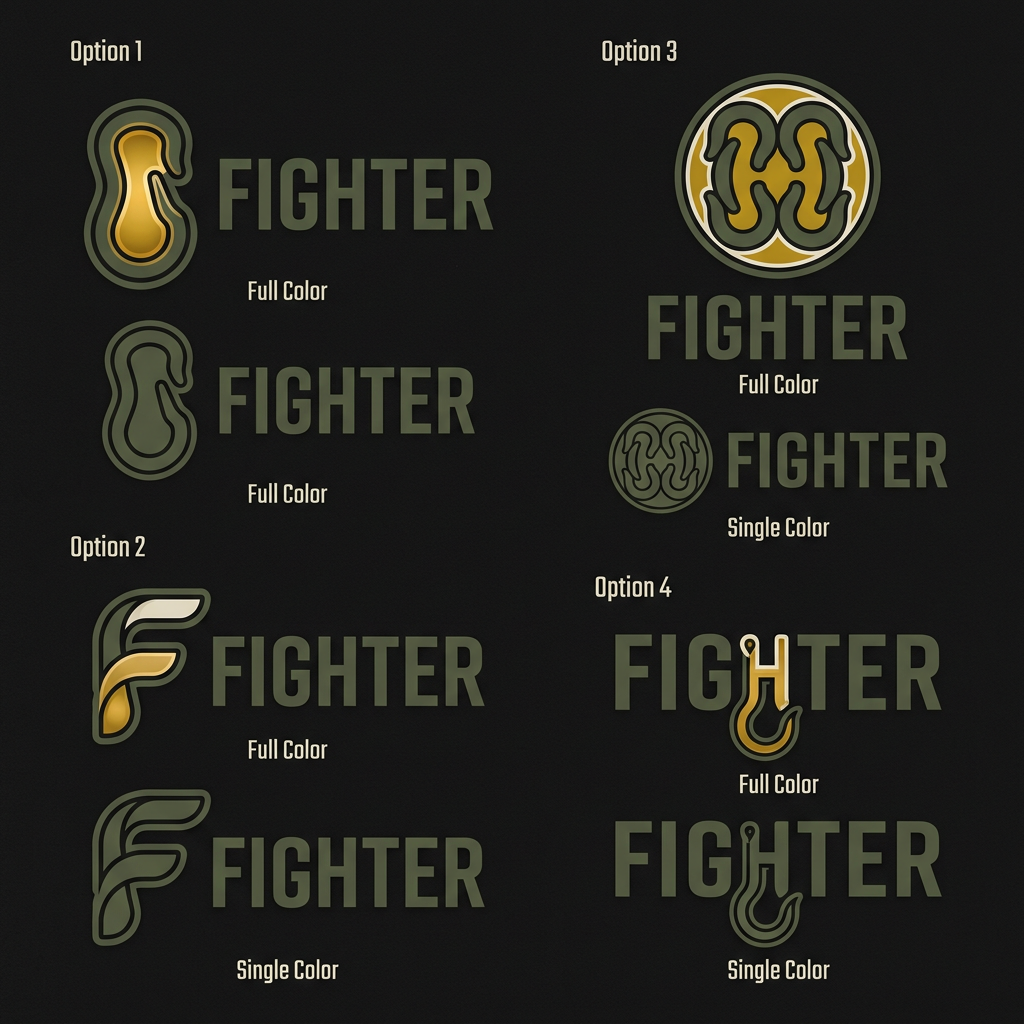
AI image design: Brief for Fighter Logo Message 1 — Context FIGHTER Safety Footwear . Design brief for the logo. Please read fully be…
Community
Design detail

Creator
@Elephant_4470227
Brief for Fighter Logo Message 1 — Context FIGHTER Safety Footwear . Design brief for the logo. Please read fully before starting. Message 2 — The Core Idea The ONE idea to hold: Hard and protective on the outside. Soft, cushioned, and comfortable on the inside. The logo must show BOTH at once. Think: egg shell / thermos flask — tough outside, warm within. Message 3 — The Hook The brand's signature feature = the speed hook (the metal lacing hook on work boots). This becomes our icon — the way the Nike swoosh became Nike. At least 2 of the 4 options must use the hook as the central mark or integrate it into the letterform. Message 4 — Reference Images (Send the two attached reference images here — the double hook and the F-hook) These are directions we like. Note: — Double hook: good precision, needs a warm inner detail added — F-hook: clever, the gold inside the F shows the soft layer. This direction is strong. Message 5 — Colours SIMILAR TO THESE .. Don’t use the same colors check with Kripi before. Palette: Outside / Hard → Deep Olive #4A5240 Inside / Warm → Military Gold #B8960C Inner lining → Sand #EDE8DC Background → Charcoal #1F1F1F Message 6 — Deliverables Need 4 logo options. Each must have: ✅ Icon + FIGHTER wordmark (not wordmark alone) ✅ Hard outer form + warm inner detail visible ✅ Gender neutral — works for both men and women workers ✅ Shown on dark charcoal background ✅ 2 versions each: full colour + single colour (all olive) Message 7 — Avoid Please avoid: ✕ Shields, helmets, military symbols ✕ Badge or crest shapes ✕ Thick cartoon outlines ✕ Wordmark only, no icon ✕ All hard, no softness — the inside warmth must show Message 8 — The Brief in One Line "The hook from the shoe becomes our logo — hard line outside, warm detail inside. Tough shell. Comfortable soul." create logo
Remix this design
Start for free with full control over models, settings, and canvas tools.
- Generate with full control over models and settings
- Save projects and share back to the community
- No design experience required
What's next?Explore more features
Go from browse to build