AI image design: Use this detailed prompt with ChatGPT, Claude, Gemini, Cursor, Bolt, Lovable, or any AI code generator: --- # AI P…
Community
Design detail

Creator
@Elephant_2146221
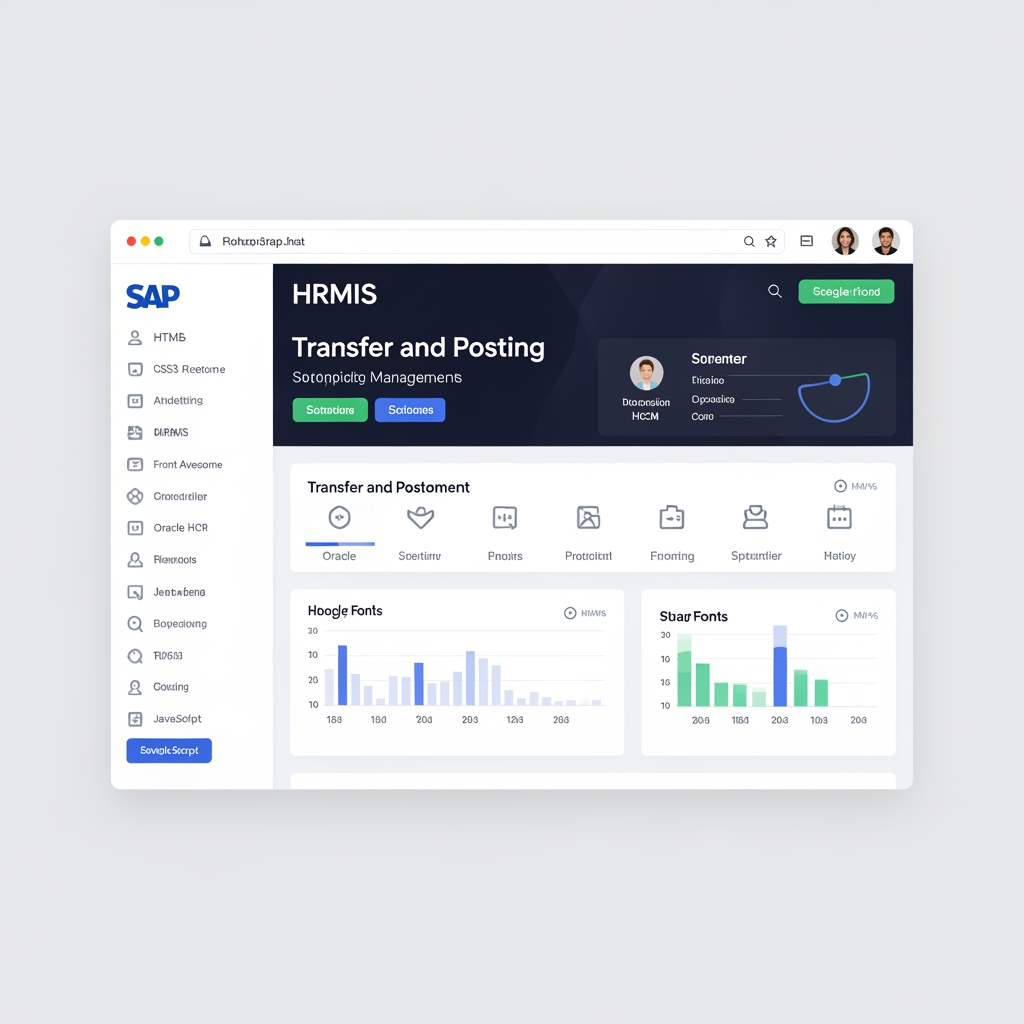
Use this detailed prompt with ChatGPT, Claude, Gemini, Cursor, Bolt, Lovable, or any AI code generator: --- # AI Prompt for Transfer & Posting Module UI Design Create a modern, enterprise-level, responsive HRMIS Transfer & Posting Management System UI using **HTML5, CSS3, Bootstrap 5, JavaScript, Font Awesome, and Google Fonts**. The design should look like a professional Government ERP/HRMIS system similar to SAP, Oracle HCM, Microsoft Dynamics, or modern admin dashboards. ## Design Requirements * Professional government portal appearance * Clean and modern dashboard * Responsive design (Desktop, Tablet, Mobile) * Use cards, tables, timelines, step indicators, and statistics widgets * Sidebar navigation with collapsible menus * Top navigation bar with notifications and user profile * Modern color scheme: * Primary: #0F4C81 * Secondary: #1F6E8C * Accent: #2E8BC0 * Success: #28A745 * Warning: #FFC107 * Danger: #DC3545 * Smooth hover effects * Modern data tables * Beautiful form controls * Professional modal popups * Dashboard analytics cards * Breadcrumb navigation --- # System Modules Create complete UI screens for the following modules: ## 1. Dashboard Display: * Total Transfer Applications * Pending Applications * Approved Transfers * Rejected Transfers * Open Transfer Cycles * Hardship Cases * Mutual Transfers * Notifications Include: * Charts * Statistics cards * Recent Activities * Pending Approvals --- ## 2. Transfer Cycle Management Create a page for cycle management. Fields: * Cycle Name * Transfer Type * Cycle Opening Date * Post Identification Deadline * Application Start Date * Application End Date * Cycle Completion Date * Max Preferences * Status Actions: * Create Cycle * Edit Cycle * Close Cycle * Extend Cycle * Submit for Approval Display cycle list in a professional data table. Include status badges: * Draft * Pending Approval * Open * Closed * Archived --- ## 3. Vacancy Management Display vacancy information: * Institute Name * Region * District * Designation * Trade * Pay Scale * Sanctioned Posts * Filled Posts * Vacant Posts * Post Status Use searchable and filterable table. --- ## 4. General Transfer Application Create a professional application form. Fields: * Application ID * Employee ID * Employee Name * CNIC * Mobile Number * Email * Cadre * Designation * Trade * Current Office * Posting Date * Tenure * Eligibility Status * Reason * Preference 1 * Preference 2 * Preference 3 * Supporting Documents * Undertaking Checkbox Show eligibility panel on top. Show only eligible vacancies. --- ## 5. Hardship Transfer Form Fields: * Hardship Type * Reason Details * Medical Certificate * Disability Certificate * Marriage Certificate * Widow/Divorce Documents * Preferred Institute Display hardship priority badge. --- ## 6. Mutual Transfer Module Display: * Employee A * Employee B * Designation * Trade * Office * Consent Checkboxes Include workflow status tracker. --- ## 7. Promotion Posting Preference Form Fields: * Promotion ID * Employee * Promoted Designation * Trade * Preference 1 * Preference 2 * Preference 3 --- ## 8. Workflow Approval Screen Create approval workflow page. Stages: 1. Employee Submission 2. Principal Review 3. District Director Review 4. Regional Director Review 5. Director Concerned Review 6. Director General Review 7. Qualification Verification 8. Tentative Merit List 9. Objection Review 10. Final Merit List 11. Chairperson Approval 12. Transfer Order Generation Display as horizontal timeline. Each stage should show: * Status * Date * Remarks --- ## 9. Merit Evaluation Module Display merit calculation. Components: * Distance Marks * Tenure Marks * Service Length Marks * Qualification Marks * Recommendation Marks Show: * Formula calculations * Merit breakdown * Total Score Include ranking table. --- ## 10. Tentative Merit List Display: * Rank * Employee * Designation * Institute * Marks * Status Include: * Search * Filters * Export to Excel * Export to PDF --- ## 11. Objection Submission Module Fields: * Objection ID * Application ID * Merit Position * Objection Type * Objection Details * Supporting Document Display objection history. --- ## 12. Grievance Committee Module Display: * Case Details * Committee Members * Decision * Voting Result * Remarks * Attachments Buttons: * Approve * Reject * Return --- ## 13. Transfer Order Module Create official order page. Display: * Order ID * Employee Name * Current Posting * New Posting * Effective Date * QR Code * Order Status Include: * Print Button * Download PDF Button * QR Verification --- ## 14. Relieving & Joining Module Fields: * Employee * Old Office * Relieve Date * Relieved By * Join Date * New Office * Joined By * Remarks Show process tracker. --- ## 15. Notifications Center Display: * Transfer Updates * Approval Requests * Cycle Opening Alerts * Objection Alerts * Order Generation Alerts --- ## UI Components Required Design and code: * Sidebar Navigation * Dashboard Cards * Data Tables * Forms * Date Pickers * Dropdowns * File Upload Controls * Status Badges * Approval Timeline * Modals * Toast Notifications * Search Filters * Pagination * Charts * User Profile Menu --- ## Coding Requirements Generate: * Complete HTML * Separate CSS File * Separate JavaScript File * Bootstrap 5 Layout * Responsive Design * Clean Code Structure * Reusable Components * Professional Comments * Dummy Data for Demonstration The output should look like a production-ready enterprise HRMIS Transfer & Posting Management System rather than a simple form-based application. The design should be visually impressive, modern, professional, and suitable for government-level deployment.
Remix this design
Start for free with full control over models, settings, and canvas tools.
- Generate with full control over models and settings
- Save projects and share back to the community
- No design experience required
What's next?Explore more features



Go from browse to build