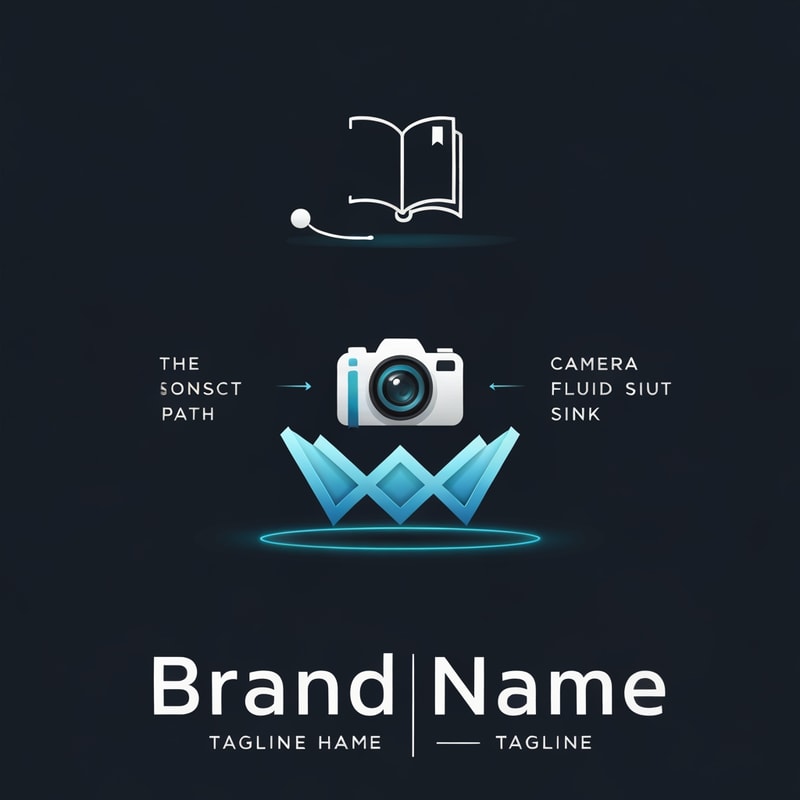
AI image design: The Intro (Breathing Dot): Start with a single dot in the center. It should "breathe out" (scale up) smoothly, then shri…
Community
Design detail
Creator
@Elephant_8688320
The Intro (Breathing Dot): Start with a single dot in the center. It should "breathe out" (scale up) smoothly, then shrink to a small size and hold momentarily. • The Path: The dot moves in a dynamic direction, leaving a constant-diameter trail behind it. • The Transformation (Pustika): The trail/dot instantly transforms into a 2D Book icon (representing "Pustika"). • The Fluid Morph: The book "breathes out" slowly while the camera performs a subtle, steady zoom-in. • The Camera Sink: The book "sinks" into the background and seamlessly transitions/morphs into the Camera Icon from my logo. • The Zoom Ramp: Perform a fast Zoom Ramp Out. As the camera zooms out, the Camera Icon moves from the center to its final locked position as seen in the static logo. • The Ribbon Reveal: The large tilted "W" shapes (ribbons) should appear via a Glow Reveal. The bottom "W" layer must reveal slightly before the top layer to create a layered depth effect. • The Final Lockup: * Brand Name: Reveal using a clean, professional motion effect. • Tagline: Both taglines should slide out horizontally from the central vertical divider bar.
Remix this design
Start for free with full control over models, settings, and canvas tools.
- Generate with full control over models and settings
- Save projects and share back to the community
- No design experience required
What's next?Explore more features
Go from browse to build