Product
Use Cases
How it Works
Pricing
Login

AI image design: The Intro (Breathing Dot): Start with a single dot in the center. It should "breathe out" (scale up) smoothly, then shri…
Back to community
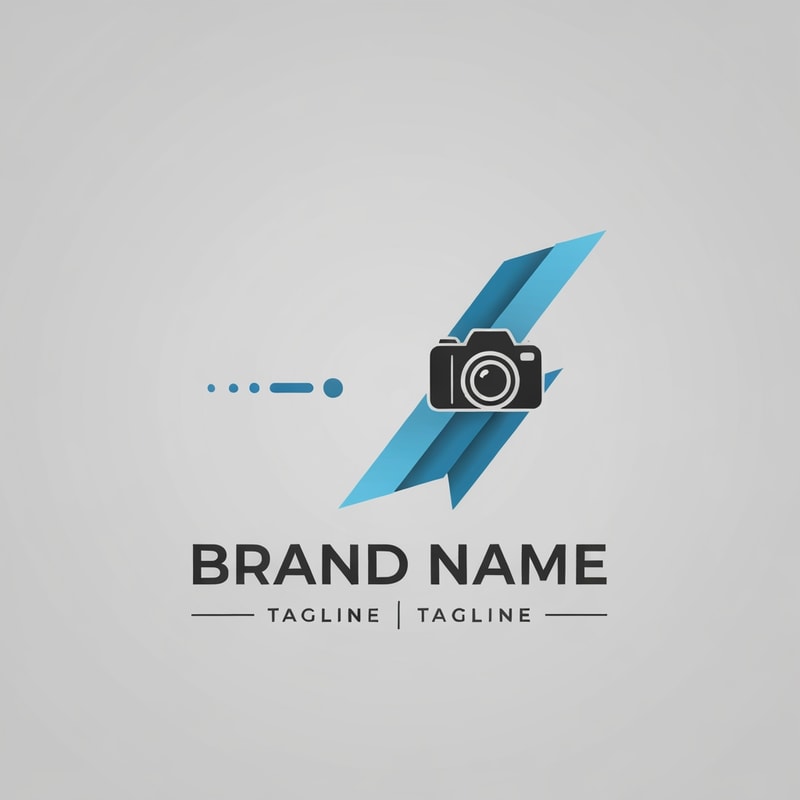
The Intro (Breathing Dot): Start with a single dot in the center. It should "breathe out" (scale up) smoothly, then shrink to a small size and hold momentarily.
• The Path: The dot moves in a dynamic direction, leaving a constant-diameter trail behind it.
• The Transformation (Pustika): The trail/dot instantly transforms into a 2D Book icon (representing "Pustika").
• The Fluid Morph: The book "breathes out" slowly while the camera performs a subtle, steady zoom-in.
• The Camera Sink: The book "sinks" into the background and seamlessly transitions/morphs into the Camera Icon from my logo.
• The Zoom Ramp: Perform a fast Zoom Ramp Out. As the camera zooms out, the Camera Icon moves from the center to its final locked position as seen in the static logo.
• The Ribbon Reveal: The large tilted "W" shapes (ribbons) should appear via a Glow Reveal. The bottom "W" layer must reveal slightly before the top layer to create a layered depth effect.
• The Final Lockup: * Brand Name: Reveal using a clean, professional motion effect.
• Tagline: Both taglines should slide out horizontally from the central vertical divider bar.

Community

Design detail

Creator

@Elephant_8688320

Created April 25, 2026
Prompt

The Intro (Breathing Dot): Start with a single dot in the center. It should "breathe out" (scale up) smoothly, then shrink to a small size and hold momentarily. • The Path: The dot moves in a dynamic direction, leaving a constant-diameter trail behind it. • The Transformation (Pustika): The trail/dot instantly transforms into a 2D Book icon (representing "Pustika"). • The Fluid Morph: The book "breathes out" slowly while the camera performs a subtle, steady zoom-in. • The Camera Sink: The book "sinks" into the background and seamlessly transitions/morphs into the Camera Icon from my logo. • The Zoom Ramp: Perform a fast Zoom Ramp Out. As the camera zooms out, the Camera Icon moves from the center to its final locked position as seen in the static logo. • The Ribbon Reveal: The large tilted "W" shapes (ribbons) should appear via a Glow Reveal. The bottom "W" layer must reveal slightly before the top layer to create a layered depth effect. • The Final Lockup: * Brand Name: Reveal using a clean, professional motion effect. • Tagline: Both taglines should slide out horizontally from the central vertical divider bar.

Remix this design

Start for free with full control over models, settings, and canvas tools.

  • ·Generate with full control over models and settings
  • ·Save projects and share back to the community
  • ·No design experience required
Start free — use this prompt
Browse more community designs →
Start free — remix this

What's next?Explore more features

Hiding Elephant product features overview

Explore features

AI generation, vector tools, workflows, catalogs, and collaboration in one workspace.

How Hiding Elephant works

How it works

See how the AI canvas, automation, and teamwork fit together end to end.

Get started with Hiding Elephant

Try it free

Sign in and turn inspiration into projects you can edit, export, and share.

Go from browse to build

Explore what else the Elephant can do.You'll love it

AI image generation

AI Generation

Image tools

Image Tools

Workflow builder

Workflows

Brand and style templates

Brand Management

Product catalog

Product Catalog

Collaboration

Collaboration

Batch image generation

Batch generation

Explore community

Community workflows

The AI designworkspace forfast-moving ideas.

Product

  • AI Generation
  • Vector Canvas
  • Image Tools
  • Workflows
  • Brand Management
  • Product Catalog
  • My Assets
  • Collaboration

Use Cases

  • E-commerce teams
  • Design agencies
  • Marketing teams
  • Content creators

Quick tools

  • All quick tools
  • Background Remover
  • Image Upscaler
  • Image Vectorizer
  • Image Optimizer
  • Image Reframer

Resources

  • About
  • Pricing
  • Enterprise
  • Explore
  • Blog
  • Contact Us
  • Book a Demo
  • Affiliates

© 2026 Hiding Elephant. All rights reserved

Cookie PolicyPrivacy PolicyTerms of Service
Hiding Elephant