Hiding Elephant
Features
Use Cases
How It Works
Pricing
Login
Start designing
Back to community
Professional logo design. Prompt:
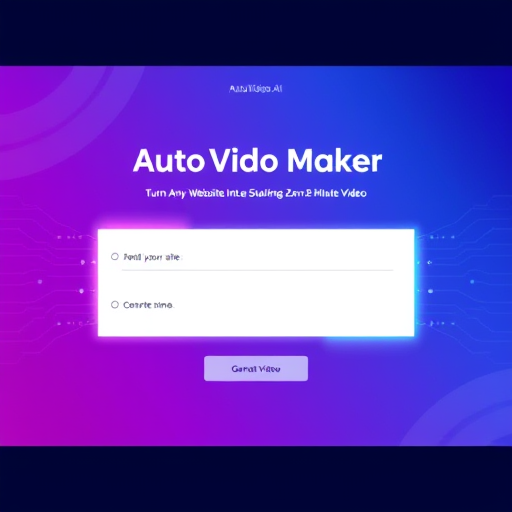
Create a modern, visually appealing, and responsive web page UI called “AutoVideo Maker”.

Core Functionality:

The page should have two main input fields:

Brand Name (placeholder: “Enter your brand name”)

Website URL (placeholder: “https://example.com”
)

A Submit button labeled “Generate Video”.

When the user submits the form:

The page should simulate reading the entered website URL.

Then show a loading animation (AI wave, glowing circle, or morphing dots).

After that, display a preview card or video area that says:
“Analyzing site... generating 2-minute video...”

Finally, replace it with a message: “✅ Your 2-minute AI video is ready!” and a video preview placeholder box.

Design Requirements:

Theme: Sleek, futuristic, and minimalistic with a tech-inspired feel.

Color Palette: Use a distinct and vibrant color theme —
Gradient mix of #3278bd, #3dbeb7, #232323, with highlights of neon blue or teal.

Typography: Use clean, modern fonts like Poppins, Inter, or Urbanist.

Input Fields:

Glassmorphism style — soft transparency with light borders and shadows.

Rounded corners and smooth focus glow.

Button:

Gradient background, hover animation (scale + glow).

Animations:

Smooth hover effects using CSS transitions or Framer Motion.

Animated background elements (subtle motion gradient, glowing dots, or AI lines).

Background:

Use a modern AI-themed illustration or abstract gradient image (like circuits, neon waves, or 3D mesh).

Slight blur or glow for a premium look.

Layout:

Navbar: Minimal with logo text “AutoVideo.AI” on top.

Hero Section: Centered title and form box in the middle of the screen.

Title: “Turn Any Website Into a Stunning 2-Minute Video”

Subtext: “Enter your brand name and website URL — our AI will read your site and generate an engaging short video.”

Footer: Small text “© 2025 Sublimity Soft Pvt. Ltd.”

Tech Stack:

HTML + Tailwind CSS + basic JavaScript

Smooth animations (Framer Motion or CSS transitions)

Fully responsive for mobile and desktop.

Goal:
Deliver a clean, futuristic landing page that feels like an AI-powered tool interface, combining elegance, clarity, and cutting-edge aesthetics.
Elephant_5102878

Creator

@Elephant_5102878

Remix this design

Free account — run this prompt in your workspace, refine it, and save your own versions.

  • ·Generate with full control over models and settings
  • ·Save projects and share back to the community
  • ·No design experience required
Start free — use this prompt
Prompt

Professional logo design. Prompt: Create a modern, visually appealing, and responsive web page UI called “AutoVideo Maker”. Core Functionality: The page should have two main input fields: Brand Name (placeholder: “Enter your brand name”) Website URL (placeholder: “https://example.com” ) A Submit button labeled “Generate Video”. When the user submits the form: The page should simulate reading the entered website URL. Then show a loading animation (AI wave, glowing circle, or morphing dots). After that, display a preview card or video area that says: “Analyzing site... generating 2-minute video...” Finally, replace it with a message: “✅ Your 2-minute AI video is ready!” and a video preview placeholder box. Design Requirements: Theme: Sleek, futuristic, and minimalistic with a tech-inspired feel. Color Palette: Use a distinct and vibrant color theme — Gradient mix of #3278bd, #3dbeb7, #232323, with highlights of neon blue or teal. Typography: Use clean, modern fonts like Poppins, Inter, or Urbanist. Input Fields: Glassmorphism style — soft transparency with light borders and shadows. Rounded corners and smooth focus glow. Button: Gradient background, hover animation (scale + glow). Animations: Smooth hover effects using CSS transitions or Framer Motion. Animated background elements (subtle motion gradient, glowing dots, or AI lines). Background: Use a modern AI-themed illustration or abstract gradient image (like circuits, neon waves, or 3D mesh). Slight blur or glow for a premium look. Layout: Navbar: Minimal with logo text “AutoVideo.AI” on top. Hero Section: Centered title and form box in the middle of the screen. Title: “Turn Any Website Into a Stunning 2-Minute Video” Subtext: “Enter your brand name and website URL — our AI will read your site and generate an engaging short video.” Footer: Small text “© 2025 Sublimity Soft Pvt. Ltd.” Tech Stack: HTML + Tailwind CSS + basic JavaScript Smooth animations (Framer Motion or CSS transitions) Fully responsive for mobile and desktop. Goal: Deliver a clean, futuristic landing page that feels like an AI-powered tool interface, combining elegance, clarity, and cutting-edge aesthetics.

Tip: copy the prompt here, or sign up free to run it directly in Hiding Elephant after you log in.

Created October 4, 2025
Browse more community designs →
Start free — remix this

Join the creative community

Start designing free

A modern design workspace for
fast-moving ideas.

Social media

© 2026 Hiding Elephant. All rights reserved.

Product

  • Homepage
  • Login / Register
  • Pricing
  • Enterprise

Features

  • AI Generation
  • Vector Canvas
  • Image Tools
  • Workflows
  • Brand Management
  • Product Catalog
  • Collaboration

Use Cases

  • Ecommerce
  • Ad Creatives
  • Social Marketing
  • Branding
  • Illustrations

Resources

  • Explore
  • Blog
  • Contact Us
  • Book a Demo
  • Affiliates
  • Cookie Policy
  • Privacy Policy
  • Terms of Service

© 2026 Hiding Elephant. All rights reserved.